Explainers
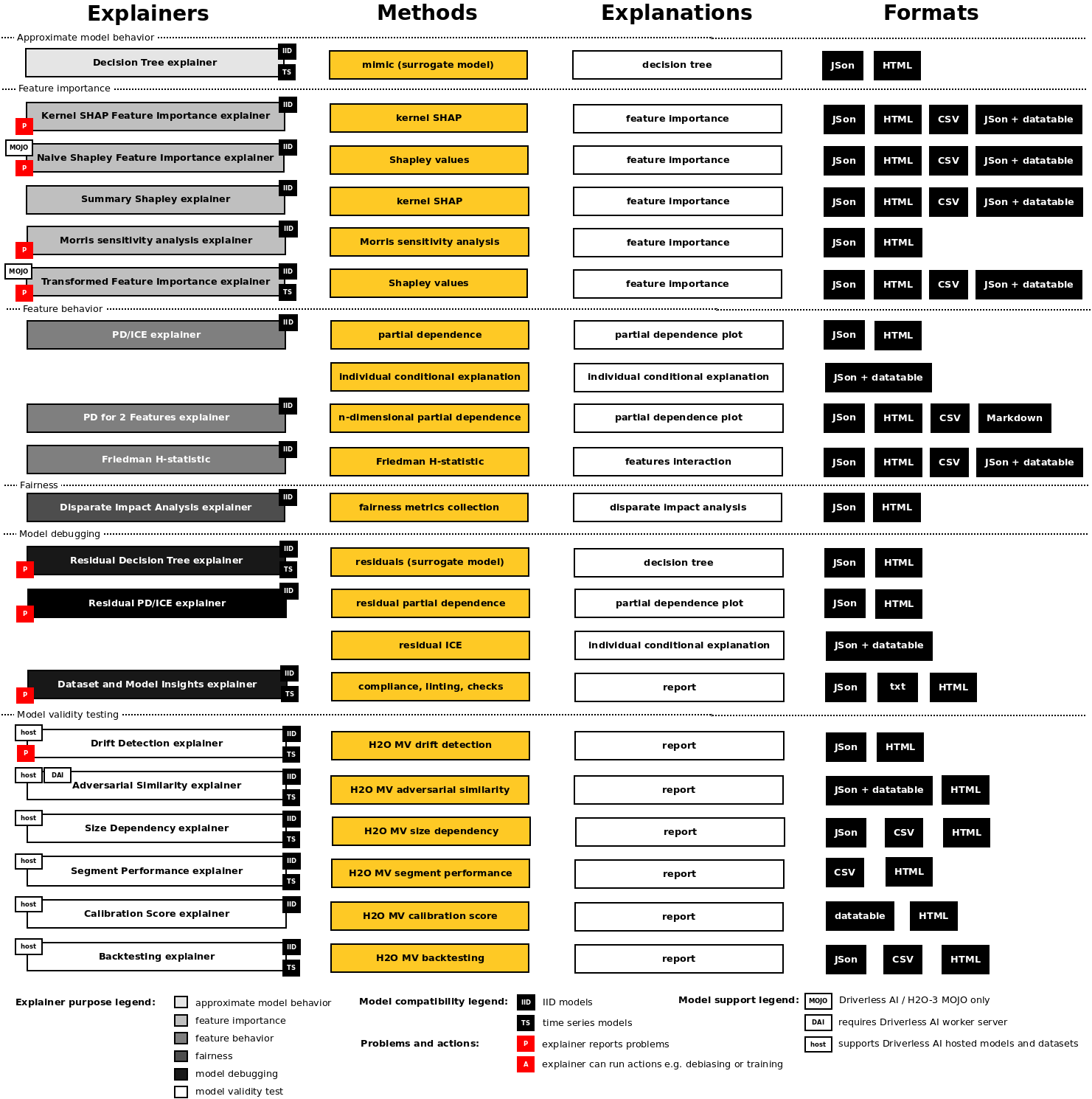
H2O Sonar explainers:
- Approximate model behavior
- Feature importance
Name |
D/M |
IID |
TS |
R |
B |
M |
G |
L |
|
|
DAI |
autoML |
|---|---|---|---|---|---|---|---|---|---|---|---|---|
Decision Tree |
M |
✓ |
✓ |
✓ |
✓ |
✓ |
✓ |
✓ |
✓ |
❌ |
❌ |
❌ |
Kernels SHAP Feature Importance |
M |
✓ |
✓ |
✓ |
✓ |
✓ |
✓ |
✓ |
✓ |
❌ |
❌ |
❌ |
Naive Shapley Feature Importance |
M |
✓ |
✓ |
✓ |
✓ |
✓ |
✓ |
✓ |
✓ |
❌ |
❌ |
❌ |
Summary Shapley |
M |
✓ |
✓ |
✓ |
✓ |
✓ |
✓ |
❌ |
✓ |
❌ |
❌ |
❌ |
Morris Sensitivity Analysis |
M |
✓ |
✓ |
✓ |
✓ |
❌ |
✓ |
❌ |
✓ |
❌ |
❌ |
❌ |
Transformed Feature Importance |
M |
✓ |
✓ |
✓ |
✓ |
✓ |
✓ |
✓ |
✓ |
❌ |
❌ |
❌ |
PD/ICE |
M |
✓ |
✓ |
✓ |
✓ |
✓ |
✓ |
✓ |
✓ |
❌ |
❌ |
❌ |
PD/ICE for 2 Features |
M |
✓ |
✓ |
✓ |
✓ |
❌ |
✓ |
❌ |
✓ |
❌ |
❌ |
❌ |
Friedman H-statistic |
M |
✓ |
✓ |
✓ |
✓ |
❌ |
✓ |
❌ |
✓ |
❌ |
❌ |
❌ |
Disparate Impact Analysis |
M |
✓ |
✓ |
✓ |
✓ |
❌ |
✓ |
❌ |
✓ |
❌ |
❌ |
❌ |
Residual Decision Tree |
M |
✓ |
✓ |
✓ |
✓ |
✓ |
✓ |
✓ |
✓ |
❌ |
❌ |
❌ |
Residual PD/ICE |
M |
✓ |
✓ |
✓ |
✓ |
✓ |
✓ |
✓ |
✓ |
❌ |
❌ |
❌ |
Dataset and Model Insights |
D+M |
✓ |
✓ |
✓ |
✓ |
✓ |
✓ |
❌ |
✓ |
❌ |
❌ |
❌ |
Adversarial Similarity |
D+rD |
✓ |
✓ |
✓ |
✓ |
✓ |
✓ |
❌ |
❌ |
❌ |
✓ |
✓ |
Backtesting |
rM |
✓ |
✓ |
✓ |
✓ |
✓ |
✓ |
❌ |
✓ |
✓ |
✓ |
❌ |
Calibration Score |
rM |
✓ |
✓ |
❌ |
✓ |
✓ |
✓ |
❌ |
✓ |
❌ |
✓ |
❌ |
Drift Detection |
D+rD |
✓ |
✓ |
✓ |
✓ |
✓ |
✓ |
❌ |
❌ |
❌ |
✓ |
❌ |
Segment Performance |
rM |
✓ |
✓ |
✓ |
✓ |
✓ |
✓ |
❌ |
✓ |
❌ |
✓ |
❌ |
Size Dependency |
rM |
✓ |
✓ |
✓ |
✓ |
✓ |
✓ |
❌ |
✓ |
❌ |
✓ |
❌ |
Legend:
- D/M
Explainer can explain local dataset (D), remote dataset hosted by Driverless AI (rD), local model (M) or remote model hosted by Driverless AI (rM).
- IID
Explainer can explain IID models (with independent and identically distributed variables).
- TS
Explainer can explain time series models.
- R
Explainer can explain models for regression problems.
- B
Explainer can explain models for binomial classification problems.
- M
Explainer can explain models for multinomial classification problems.
- Global
Explainer provides global explanations.
- Local
Explainer provides local explanations.
- p()
Model must support
predict()method.
- r()
Model must support
retrain()orrefit()method.
- DAI
Explainer requires Driverless AI connection of the server which may host explained datasets and/or models.
- autoML
Explainer requires connection to autoML Driverless AI worker in order to run experiments.
Explainer Parameters
Explainers can be parameterized using the parameters documented in the sections below. These parameters are explainer specific and can be passed to explainers using the Python API as follows:
interpretation = interpret.run_interpretation(
    dataset=dataset_path,
    model=mock_model,
    target_col=target_col,
    explainers=[
        commons.ExplainerToRun(
            explainer_id=explainer.PdIceExplainer.explainer_id(),
            params={
                explainer.PdIceExplainer.PARAM_MAX_FEATURES: param_max_features,
                explainer.PdIceExplainer.PARAM_GRID_RESOLUTION: param_bins,
            },
        )
    ],
    ...
)
In the example above, max_features and grid_parameters parameters are passed
to the PdIceExplainer. An instance of the ExplainerToRun class is used
to specify explainer ID and its parameters, which are passed in a dictionary,
where the key is string identifier of the parameter and value is the parameter value.
Similarly parameters can be passed to the explainers using the command line (CLI) interface:
h2o-sonar run interpretation
  --dataset=dataset.csv
  --model=model.pickle
  --target-col=PROFIT
  --explainers=h2o_sonar.explainers.pd_ice_explainer.PdIceExplainer
  --explainers-pars=
    "{'h2o_sonar.explainers.pd_ice_explainer.PdIceExplainer':{'max_features': 5}}"
Surrogate Decision Tree Explainer
The decision tree surrogate is an approximate overall flow chart of the model, created by training a simple decision tree on the original inputs and the predictions of the model.
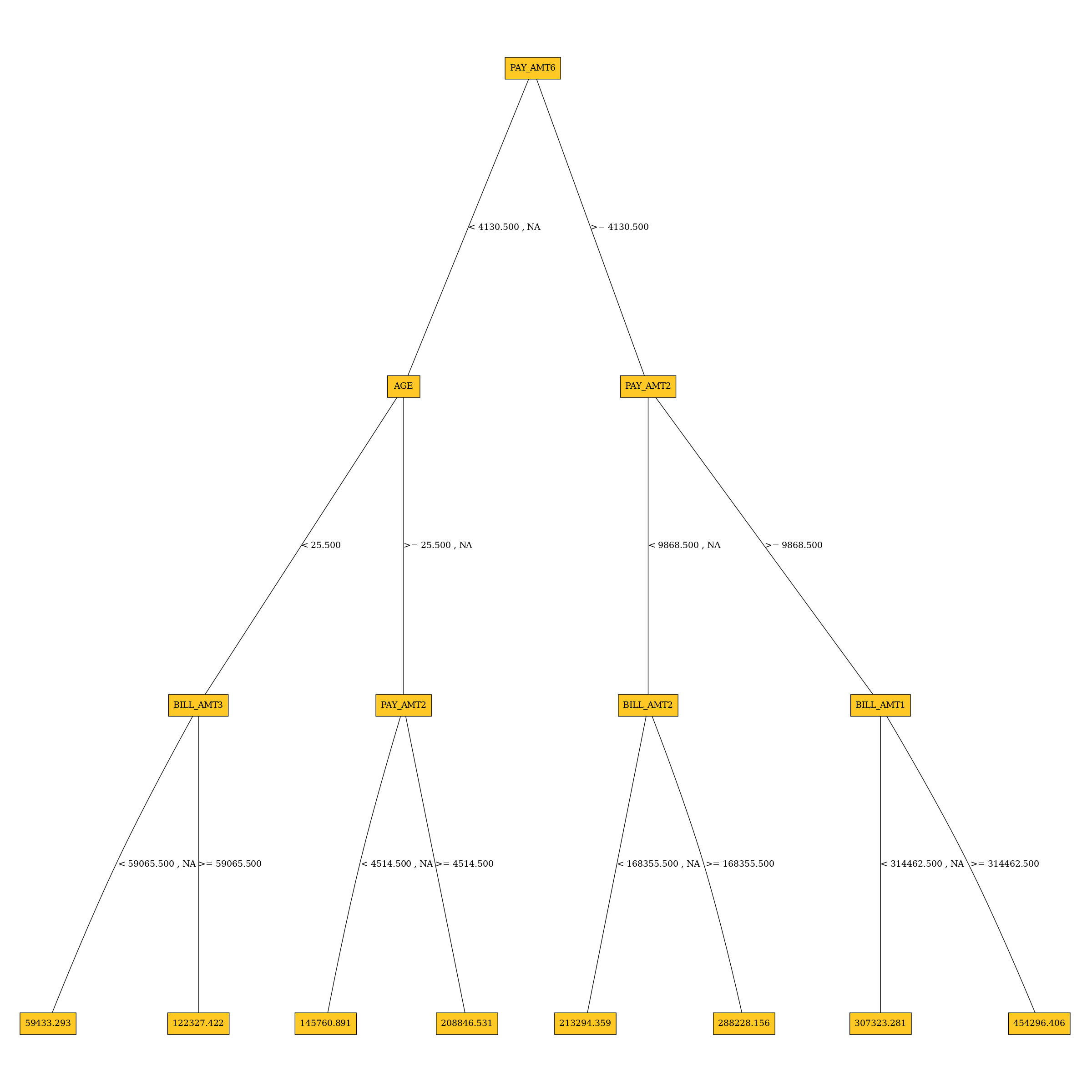
Explainer parameters:
debug_residualsDebug model residuals.
debug_residuals_classClass for debugging classification model
loglossresiduals, empty string for debugging regression model residuals.
dt_tree_depthDecision tree depth.
nfoldsNumber of CV folds.
qbin_colsQuantile binning columns.
qbin_countQuantile bins count.
categorical_encoding- Categorical encoding - specify one of the following encoding schemes for handling of categorical features:
AUTO: 1 column per categorical feature.Enum Limited: Automatically reduce categorical levels to the most prevalent ones during training and only keep the top 10 most frequent levels.One Hot Encoding: N+1 new columns for categorical features with N levels.Label Encoder: Convert every enum into the integer of its index (for example, level 0 -> 0, level 1 -> 1, etc.).Sort by Response: Reorders the levels by the mean response (for example, the level with lowest response -> 0, the level with second-lowest response -> 1, etc.).
Explainer result directory description:
explainer_h2o_sonar_explainers_dt_surrogate_explainer_DecisionTreeSurrogateExplainer_89c7869d-666d-4ba2-ba84-cf1aa1b903bd
├── global_custom_archive
│   ├── application_zip
│   │   └── explanation.zip
│   └── application_zip.meta
├── global_decision_tree
│   ├── application_json
│   │   ├── dt_class_0.json
│   │   └── explanation.json
│   └── application_json.meta
├── local_decision_tree
│   ├── application_json
│   │   └── explanation.json
│   └── application_json.meta
├── log
│   └── explainer_run_89c7869d-666d-4ba2-ba84-cf1aa1b903bd.log
├── result_descriptor.json
└── work
    ├── dtModel.json
    ├── dtpaths_frame.bin
    ├── dtPathsFrame.csv
    ├── dtsurr_mojo.zip
    ├── dtSurrogate.json
    └── dt_surrogate_rules.zip
explainer_.../work/dtSurrogate.jsonDecision tree in JSon format.
explainer_.../work/dt_surrogate_rules.zipDecision tree rules (in Python and text format) stored in ZIP archive.
explainer_.../work/dtpaths_frame.binDecision tree paths stored as
datatableframe.
explainer_.../work/dtPathsFrame.csvDecision tree paths stored as CSV file.
explainer_.../work/dtsurr_mojo.zipDecision tree model stored as zipped H2O-3 MOJO.
explainer_.../work/dtModel.jsonDecision tree model in JSon format.
Explanations created by the explainer:
global_custom_archiveZIP archive with explainer artifacts.
global_decision_treeDecision tree explanation in the JSon format.
local_decision_treeLocal (per dataset row) decision tree explanations in the JSon format.
See also:
Residual Surrogate Decision Tree Explainer
The residual surrogate decision tree predicts which paths in the tree (paths explain
approximate model behavior) lead to highest or lowest error.
The residual surrogate decision tree is created by training a
simple decision tree on the residuals of the predictions of the model.
Residuals are differences between observed and predicted values which can be
used as targets in surrogate models for the purpose of model debugging.
The method used to calculate residuals varies depending on the type of
problem. For classification problems, logloss residuals are calculated for
a specified class. For regression problems, residuals are determined by
calculating the square of the difference between targeted and predicted
values.”
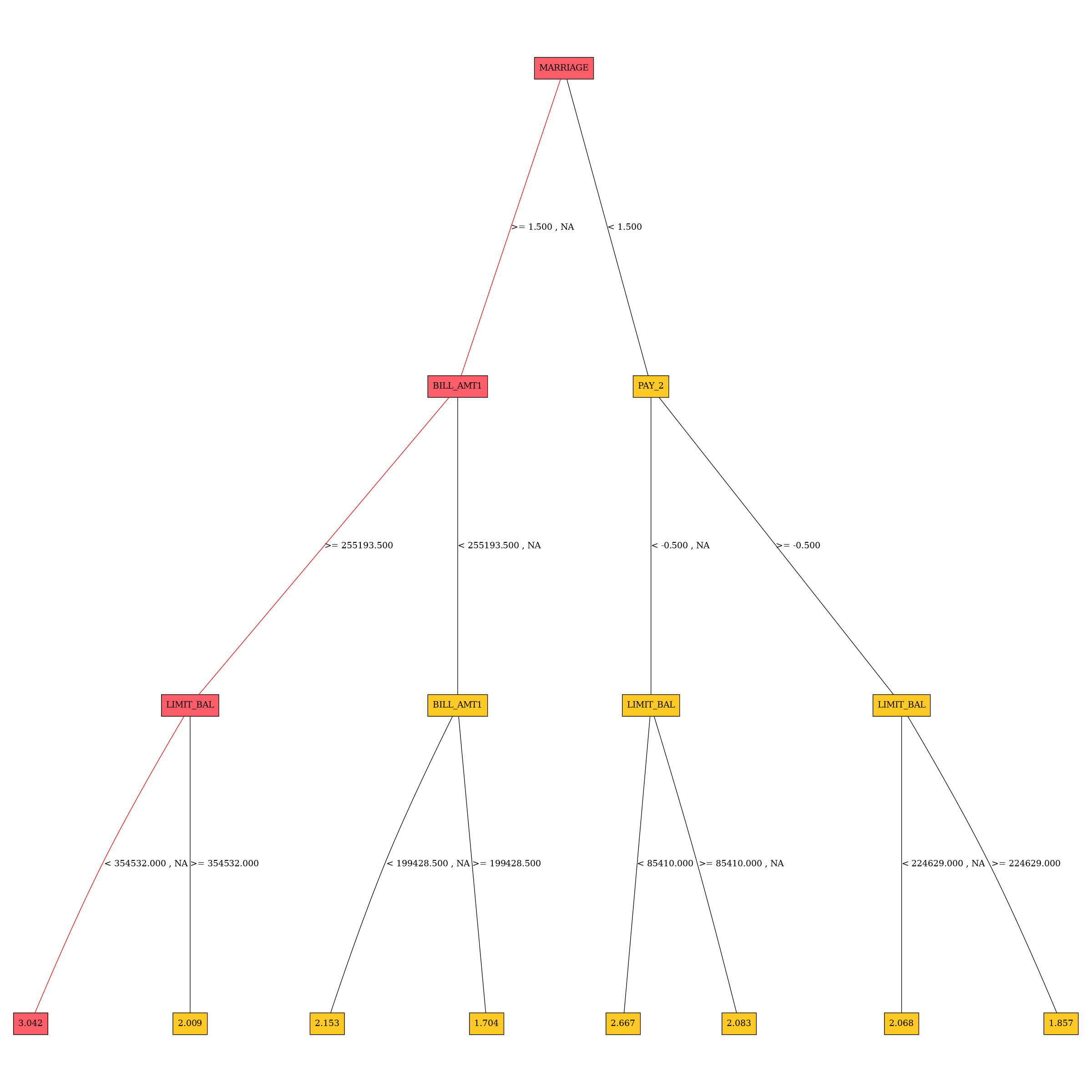
Explainer parameters:
debug_residuals_classClass for debugging classification model
loglossresiduals, empty string for debugging regression model residuals.
dt_tree_depthDecision tree depth.
nfoldsNumber of CV folds.
qbin_colsQuantile binning columns.
qbin_countQuantile bins count.
categorical_encodingCategorical encoding - specify one of the following encoding schemes for handling of categorical features:
AUTO: 1 column per categorical feature.Enum Limited: Automatically reduce categorical levels to the most prevalent ones during training and only keep the top 10 most frequent levels.One Hot Encoding: N+1 new columns for categorical features with N levels.Label Encoder: Convert every enum into the integer of its index (for example, level 0 -> 0, level 1 -> 1, etc.).Sort by Response: Reorders the levels by the mean response(for example, the level with lowest response -> 0, the level with second-lowest response -> 1, etc.).
Explainer result directory description:
explainer_h2o_sonar_explainers_residual_dt_surrogate_explainer_ResidualDecisionTreeSurrogateExplainer_606aa553-e0f4-4a6f-a6b6-366955ca938d
├── global_custom_archive
│   ├── application_zip
│   │   └── explanation.zip
│   └── application_zip.meta
├── global_decision_tree
│   ├── application_json
│   │   ├── dt_class_0.json
│   │   └── explanation.json
│   └── application_json.meta
├── global_html_fragment
│   ├── text_html
│   │   ├── dt-class-0.png
│   │   └── explanation.html
│   └── text_html.meta
├── local_decision_tree
│   ├── application_json
│   │   └── explanation.json
│   └── application_json.meta
├── log
│   └── explainer_run_606aa553-e0f4-4a6f-a6b6-366955ca938d.log
├── result_descriptor.json
└── work
    ├── dt-class-0.dot
    ├── dt-class-0.dot.pdf
    ├── dtModel.json
    ├── dtpaths_frame.bin
    ├── dtPathsFrame.csv
    ├── dtsurr_mojo.zip
    ├── dtSurrogate.json
    └── dt_surrogate_rules.zip
explainer_.../work/dtSurrogate.jsonDecision tree in JSon format.
explainer_.../work/dt_surrogate_rules.zipDecision tree rules (in Python and text format) stored in ZIP archive.
explainer_.../work/dtpaths_frame.binDecision tree paths stored as
datatableframe.
explainer_.../work/dtPathsFrame.csvDecision tree paths stored as CSV file.
explainer_.../work/dtsurr_mojo.zipDecision tree model stored as zipped H2O-3 MOJO.
explainer_.../work/dtModel.jsonDecision tree model in JSon format.
Explanations created by the explainer:
global_custom_archiveZIP archive with explainer artifacts.
global_decision_treeDecision tree explanation in the JSon format.
local_decision_treeLocal (per dataset row) decision tree explanations in the JSon format.
Problems reported by the explainer:
- Path leading to the highest error
The explainer reports residual decision tree path that leads to the highest error. This path should be investigated to determine whether it indicates a problem with the model.
Problem severity:
LOW.
See also:
Shapley Summary Plot for Original Features (Naive Shapley Method) Explainer
Shapley explanations are a technique with credible theoretical support that presents consistent global and local feature contributions.
The Shapley Summary Plot shows original features versus their local Shapley values on a sample of the dataset. Feature values are binned by Shapley values and the average normalized feature value for each bin is plotted. The legend corresponds to numeric features and maps to their normalized value - yellow is the lowest value and deep orange is the highest. You can also get scatter plot of the actual numeric feature values versus their corresponding Shapley values. Categorical features are shown in grey and do not provide an actual-value scatter plot.
Notes:
The Shapley Summary Plot only shows original features that are used in the model.
The dataset sample size and the number of bins can be updated in the interpretation parameters.
If feature engineering is turned off and there is no sampling, then the Naive Shapley values should match the transformed Shapley values.
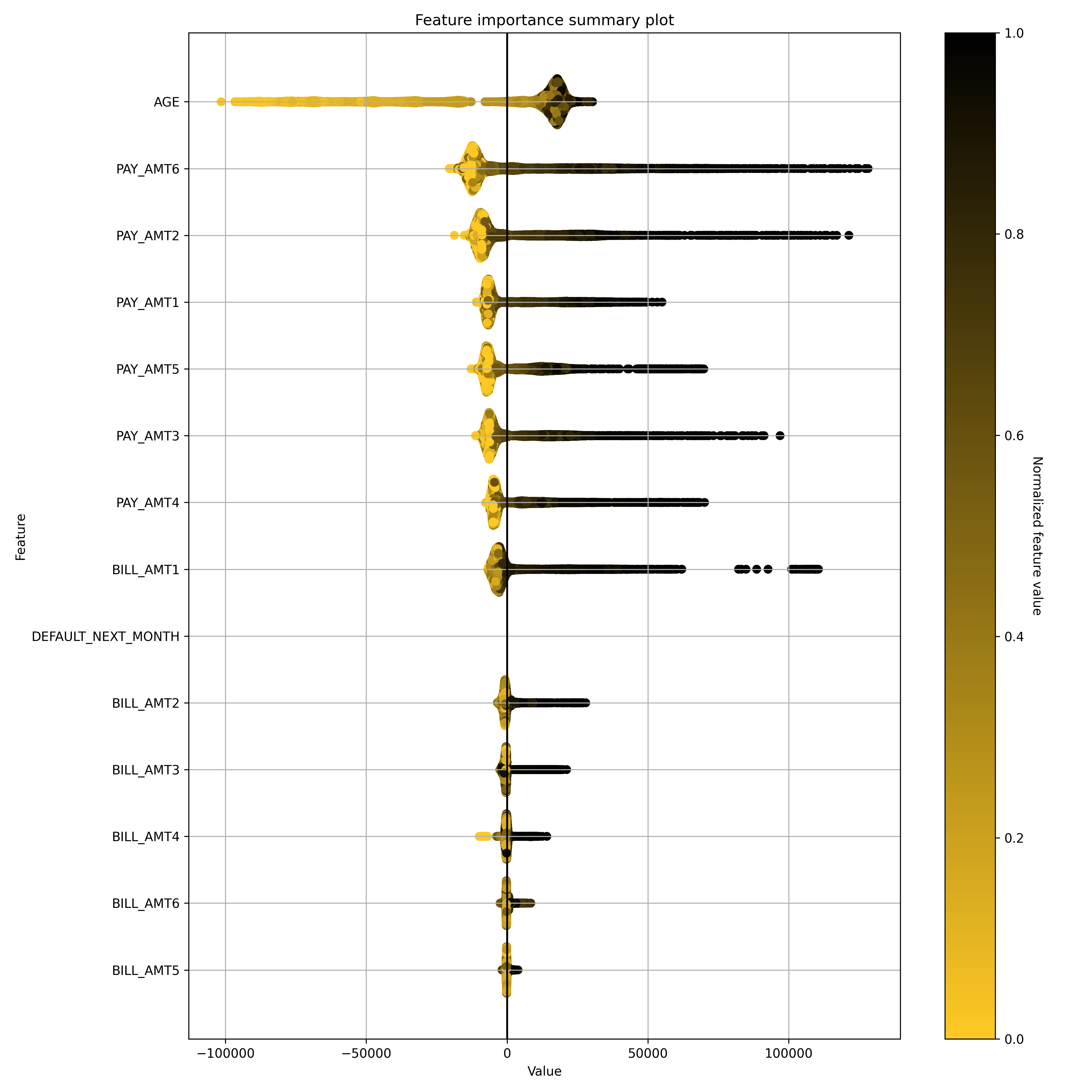
Explainer parameters:
sample_sizeSample size (default is
100 000).
max_featuresMaximum number of features to be shown in the plot.
x_shapley_resolutionX-axis resolution (number of Shapley values bins).
enable_drill_down_chartsEnable creation of per-feature Shapley/feature value scatter plots.
Explainer result directory description:
explainer_h2o_sonar_explainers_summary_shap_explainer_SummaryShapleyExplainer_36d41c37-7641-4519-9358-a7ddc947f704
├── global_summary_feature_importance
│   ├── application_json
│   │   ├── explanation.json
│   │   ├── feature_0_class_0.png
│   │   ├── feature_10_class_0.png
│   │   ├── feature_11_class_0.png
│   │   ├── feature_12_class_0.png
│   │   ├── feature_13_class_0.png
│   │   ├── feature_14_class_0.png
│   │   ├── feature_15_class_0.png
│   │   ├── feature_16_class_0.png
│   │   ├── feature_17_class_0.png
│   │   ├── feature_18_class_0.png
│   │   ├── feature_19_class_0.png
│   │   ├── feature_1_class_0.png
│   │   ├── feature_20_class_0.png
│   │   ├── feature_21_class_0.png
│   │   ├── feature_22_class_0.png
│   │   ├── feature_23_class_0.png
│   │   ├── feature_2_class_0.png
│   │   ├── feature_3_class_0.png
│   │   ├── feature_4_class_0.png
│   │   ├── feature_5_class_0.png
│   │   ├── feature_6_class_0.png
│   │   ├── feature_7_class_0.png
│   │   ├── feature_8_class_0.png
│   │   ├── feature_9_class_0.png
│   │   ├── summary_feature_importance_class_0_offset_0.json
│   │   ├── summary_feature_importance_class_0_offset_1.json
│   │   └── summary_feature_importance_class_0_offset_2.json
│   ├── application_json.meta
│   ├── application_vnd_h2oai_json_datatable_jay
│   │   ├── explanation.json
│   │   └── summary_feature_importance_class_0.jay
│   ├── application_vnd_h2oai_json_datatable_jay.meta
│   ├── text_markdown
│   │   ├── explanation.md
│   │   └── shapley-class-0.png
│   └── text_markdown.meta
├── log
│   └── explainer_run_36d41c37-7641-4519-9358-a7ddc947f704.log
├── result_descriptor.json
└── work
    ├── raw_shapley_contribs_class_0.jay
    ├── raw_shapley_contribs_index.json
    ├── report.md
    └── shapley-class-0.png
explainer_.../work/report.mdMarkdown report with per-class summary Shapley feature importance charts (
shapley-class-<class number>.png).
explainer_.../work/raw_shapley_contribs_index.jsonPer model class Shapley contributions JSon index - it references
datatable.jayframe with the contributions for each class of the model.
Explanations created by the explainer:
global_summary_feature_importanceSummary original feature importance explanation in Markdown (text and global chart), JSon (includes drill-down scatter plots) and
datatableformats.
See also:
Shapley Values for Original Features (Kernel SHAP Method) Explainer
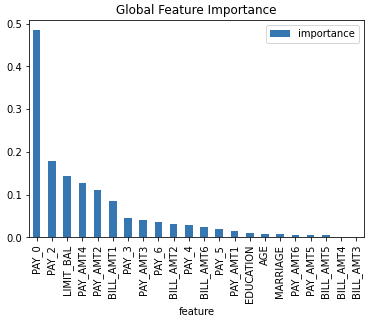
Shapley explanations are a technique with credible theoretical support that presents consistent global and local variable contributions. Local numeric Shapley values are calculated by tracing single rows of data through a trained tree ensemble and aggregating the contribution of each input variable as the row of data moves through the trained ensemble. For regression tasks, Shapley values sum to the prediction of the Driverless AI model. For classification problems, Shapley values sum to the prediction of the Driverless AI model before applying the link function. Global Shapley values are the average of the absolute Shapley values over every row of a dataset. Shapley values for original features are calculated with the Kernel Explainer method, which uses a special weighted linear regression to compute the importance of each feature. More information about Kernel SHAP is available at A Unified Approach to Interpreting Model Predictions.
Explainer parameters:
sample_sizeSample size (default is
100 000).
sampleWhether to sample Kernel SHAP (default is
True).
nsampleNumber of times to re-evaluate the model when explaining each prediction with Kernel Explainer. Default is determined internally.’auto’ or int. Number of times to re-evaluate the model when explaining each prediction. More samples lead to lower variance estimates of the SHAP values. The ‘auto’ setting uses
nsamples = 2 * X.shape[1] + 2048. This setting is disabled by default and runtime determines the right number internally.
L1L1 regularization for Kernel Explainer. ” ‘num_features(int)’, ‘auto’ (default for now, ” but deprecated), ‘aic’, ‘bic’, or float. The L1 regularization to use for feature selection (the estimation procedure is based on a debiased lasso). The ‘auto’ option currently uses aic when less that 20% of the possible sample space is enumerated, otherwise it uses no regularization. The aic and bic options use the AIC and BIC rules for regularization. Using ‘num_features(int)’ selects a fix number of top features. Passing a float directly sets the alpha parameter of the
sklearn.linear_model.Lassomodel used for feature selection.
max_runtimeMax runtime for Kernel explainer in seconds.
leakage_warning_thresholdThreshold for showing potential data leakage in the most important feature. Data leakage occurs when a feature influences the target column too much. High feature importance value means that the model you trained with this dataset will not be predicting the target based on all features but rather on just one. More about feature data leakage (also target leakage) at Target leakage H2O.ai Wiki.
Explainer result directory description:
explainer_h2o_sonar_explainers_fi_kernel_shap_explainer_KernelShapFeatureImportanceExplainer_aef847c4-9b5b-458c-a5e6-0ce7fa99748b
├── global_feature_importance
│   ├── application_json
│   │   ├── explanation.json
│   │   └── feature_importance_class_0.json
│   ├── application_json.meta
│   ├── application_vnd_h2oai_json_csv
│   │   ├── explanation.json
│   │   └── feature_importance_class_0.csv
│   ├── application_vnd_h2oai_json_csv.meta
│   ├── application_vnd_h2oai_json_datatable_jay
│   │   ├── explanation.json
│   │   └── feature_importance_class_0.jay
│   └── application_vnd_h2oai_json_datatable_jay.meta
├── local_feature_importance
│   ├── application_vnd_h2oai_json_datatable_jay
│   │   ├── explanation.json
│   │   ├── feature_importance_class_0.jay
│   │   └── y_hat.bin
│   └── application_vnd_h2oai_json_datatable_jay.meta
├── log
│   └── explainer_run_aef847c4-9b5b-458c-a5e6-0ce7fa99748b.log
├── result_descriptor.json
└── work
    ├── shapley_formatted_orig_feat.zip
    ├── shapley.orig.feat.bin
    ├── shapley.orig.feat.csv
    └── y_hat.bin
explainer_.../work/y_hatPrediction for the dataset.
explainer_.../work/shapley.orig.feat.binOriginal model features importance as
datatableframe.
explainer_.../work/shapley.orig.feat.csvOriginal model features importance as CSV file.
explainer_.../work/shapley_formatted_orig_feat.zipArchive with (re)formatted original features importance.
Explanations created by the explainer:
global_feature_importanceOriginal feature importance in JSon, CSV and
datatableformats.
local_feature_importanceLocal (per dataset row) original feature importance in the
datatableformat.
Problems reported by the explainer:
- Potential feature importance leak
The explainer reports a column with potential feature importance leak. Such column should be investigated and in case of the leak either removed from the dataset or weighted down in the model training process.
Problem severity:
HIGH.
See also:
Shapley Values for Original Features of MOJO Models (Naive Method) Explainer
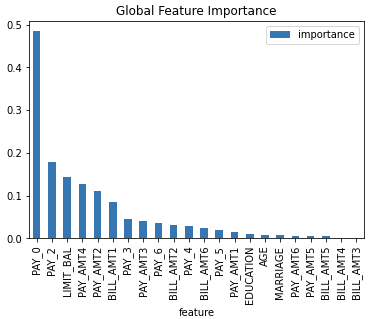
Shapley values for original features of (Driverless AI) MOJO models are
approximated from the accompanying Shapley values for transformed features
with the Naive Shapley method. This method makes the assumption that input
features to a transformer are independent. For example, if the transformed
feature, feature1_feature2, has a Shapley value of 0.5, then the
Shapley value of the original features feature1 and feature2 will
be 0.25 each.
Explainer parameters:
sample_sizeSample size (default is
100 000).
leakage_warning_thresholdThreshold for showing potential data leakage in the most important feature. Data leakage occurs when a feature influences the target column too much. High feature importance value means that the model you trained with this dataset will not be predicting the target based on all features but rather on just one. More about feature data leakage (also target leakage) at Target leakage H2O.ai Wiki.
Explainer result directory description:
explainer_h2o_sonar_explainers_fi_naive_shapley_explainer_NaiveShapleyMojoFeatureImportanceExplainer_dbeeb343-7233-4153-a3da-8df0625b9925
├── global_feature_importance
│   ├── application_json
│   │   ├── explanation.json
│   │   └── feature_importance_class_0.json
│   ├── application_json.meta
│   ├── application_vnd_h2oai_json_csv
│   │   ├── explanation.json
│   │   └── feature_importance_class_0.csv
│   ├── application_vnd_h2oai_json_csv.meta
│   ├── application_vnd_h2oai_json_datatable_jay
│   │   ├── explanation.json
│   │   └── feature_importance_class_0.jay
│   └── application_vnd_h2oai_json_datatable_jay.meta
├── local_feature_importance
│   ├── application_vnd_h2oai_json_datatable_jay
│   │   ├── explanation.json
│   │   ├── feature_importance_class_0.jay
│   │   └── y_hat.bin
│   └── application_vnd_h2oai_json_datatable_jay.meta
├── log
│   └── explainer_run_dbeeb343-7233-4153-a3da-8df0625b9925.log
├── result_descriptor.json
└── work
    ├── shapley_formatted_orig_feat.zip
    ├── shapley.orig.feat.bin
    ├── shapley.orig.feat.csv
    └── y_hat.bin
explainer_.../work/y_hatPrediction for the dataset.
explainer_.../work/shapley.orig.feat.binOriginal model features importance as
datatableframe.
explainer_.../work/shapley.orig.feat.csvOriginal model features importance as CSV file.
explainer_.../work/shapley_formatted_orig_feat.zipArchive with (re)formatted original features importance.
Explanations created by the explainer:
global_feature_importanceOriginal feature importance in JSon, CSV and
datatableformats.
local_feature_importanceLocal (per dataset row) original feature importance in the
datatableformat.
Problems reported by the explainer:
- Potential feature importance leak
The explainer reports a column with potential feature importance leak. Such column should be investigated and in case of the leak either removed from the dataset or weighted down in the model training process.
Problem severity:
HIGH.
See also:
Shapley Values for Transformed Features of MOJO Models Explainer
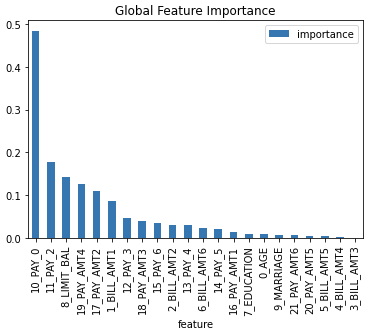
Shapley explanations are a technique with credible theoretical support that presents consistent global and local variable contributions. Local numeric Shapley values are calculated by tracing single rows of data through a trained tree ensemble and aggregating the contribution of each input variable as the row of data moves through the trained ensemble. For regression tasks Shapley values sum to the prediction of the (Driverless AI) MOJO model. For classification problems, Shapley values sum to the prediction of the MOJO model before applying the link function. Global Shapley values are the average of the absolute local Shapley values over every row of a data set.
Explainer parameters:
sample_sizeSample size (default is
100 000).
calculate_predictionsScore dataset and include predictions in the explanation (local explanations speed-up cache).
Explainer result directory description:
explainer_h2o_sonar_explainers_transformed_fi_shapley_explainer_ShapleyMojoTransformedFeatureImportanceExplainer_3390cc51-3560-40c6-97c7-2980f2a77dae
├── global_feature_importance
│   ├── application_json
│   │   ├── explanation.json
│   │   └── feature_importance_class_0.json
│   ├── application_json.meta
│   ├── application_vnd_h2oai_json_csv
│   │   ├── explanation.json
│   │   └── feature_importance_class_0.csv
│   ├── application_vnd_h2oai_json_csv.meta
│   ├── application_vnd_h2oai_json_datatable_jay
│   │   ├── explanation.json
│   │   └── feature_importance_class_0.jay
│   └── application_vnd_h2oai_json_datatable_jay.meta
├── local_feature_importance
│   ├── application_vnd_h2oai_json_datatable_jay
│   │   ├── explanation.json
│   │   └── feature_importance_class_0.jay
│   └── application_vnd_h2oai_json_datatable_jay.meta
├── log
│   └── explainer_run_3390cc51-3560-40c6-97c7-2980f2a77dae.log
├── result_descriptor.json
└── work
    ├── shapley.bin
    ├── shapley.csv
    └── shapley_formatted.zip
explainer_.../work/shapley.binTransformed model features importance as
datatableframe.
explainer_.../work/shapley.csvTransformed model features importance as CSV file.
explainer_.../work/shapley_formatted.zipArchive with (re)formatted transformed features importance.
Explanations created by the explainer:
global_feature_importanceTransformed feature importance in JSon, CSV and
datatableformats.
local_feature_importanceLocal (per dataset row) transformed feature importance in the
datatableformat.
Problems reported by the explainer:
- Potential feature importance leak
The explainer reports a column with potential feature importance leak. Such column should be investigated and in case of the leak associated original features analyzed.
Problem severity:
HIGH.
See also:
Partial Dependence/Individual Conditional Expectations (PD/ICE) Explainer
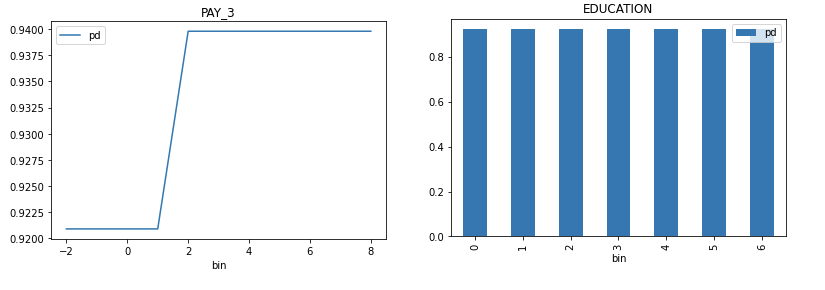
Partial dependence plot (PDP) portrays the average prediction behavior of the model across the domain of an input variable along with +/- 1 standard deviation bands. Individual Conditional Expectations plot (ICE) displays the prediction behavior for an individual row of data when an input variable is toggled across its domain.
Explainer parameters:
sample_sizeSample size (default is
100 000).
max_featuresPartial Dependence Plot number of features (to see all features used by model set to
-1).
featuresPartial Dependence Plot feature list.
grid_resolutionPartial Dependence Plot observations per bin (number of equally spaced points used to create bins).
oor_grid_resolutionPartial Dependence Plot number of out of range bins.
centerCenter Partial Dependence Plot using ICE centered at 0.
sort_binsEnsure bin values sorting.
quantile-bin-grid-resolutionPartial Dependence Plot quantile binning (total quantile points used to create bins).
quantile-binsPer-feature quantile binning.
Example: if choosing features
F1andF2, this parameter is{"F1": 2,"F2": 5}. Note, you can set all features to use the same quantile binning with the “Partial Dependence Plot quantile binning” parameter and then adjust the quantile binning for a subset of PDP features with this parameter.
histogramsEnable or disable histograms.
numcat_num_chartUnique feature values count driven Partial Dependence Plot binning and chart selection.
numcat_thresholdThreshold for Partial Dependence Plot binning and chart selection (<= threshold categorical, > threshold numeric).
Explainer result directory description:
explainer_h2o_sonar_explainers_pd_ice_explainer_PdIceExplainer_ee264725-cdab-476c-bad5-02cf778e1c1e
├── global_partial_dependence
│   ├── application_json
│   │   ├── explanation.json
│   │   ├── pd_feature_0_class_0.json
│   │   ├── pd_feature_1_class_0.json
│   │   ├── pd_feature_2_class_0.json
│   │   ├── pd_feature_3_class_0.json
│   │   ├── pd_feature_4_class_0.json
│   │   ├── pd_feature_5_class_0.json
│   │   ├── pd_feature_6_class_0.json
│   │   ├── pd_feature_7_class_0.json
│   │   ├── pd_feature_8_class_0.json
│   │   └── pd_feature_9_class_0.json
│   └── application_json.meta
├── local_individual_conditional_explanation
│   ├── application_vnd_h2oai_json_datatable_jay
│   │   ├── explanation.json
│   │   ├── ice_feature_0_class_0.jay
│   │   ├── ice_feature_1_class_0.jay
│   │   ├── ice_feature_2_class_0.jay
│   │   ├── ice_feature_3_class_0.jay
│   │   ├── ice_feature_4_class_0.jay
│   │   ├── ice_feature_5_class_0.jay
│   │   ├── ice_feature_6_class_0.jay
│   │   ├── ice_feature_7_class_0.jay
│   │   ├── ice_feature_8_class_0.jay
│   │   ├── ice_feature_9_class_0.jay
│   │   └── y_hat.jay
│   └── application_vnd_h2oai_json_datatable_jay.meta
├── log
│   └── explainer_run_ee264725-cdab-476c-bad5-02cf778e1c1e.log
├── result_descriptor.json
└── work
    ├── h2o_sonar-ice-dai-model-10.jay
    ├── h2o_sonar-ice-dai-model-1.jay
    ├── h2o_sonar-ice-dai-model-2.jay
    ├── h2o_sonar-ice-dai-model-3.jay
    ├── h2o_sonar-ice-dai-model-4.jay
    ├── h2o_sonar-ice-dai-model-5.jay
    ├── h2o_sonar-ice-dai-model-6.jay
    ├── h2o_sonar-ice-dai-model-7.jay
    ├── h2o_sonar-ice-dai-model-8.jay
    ├── h2o_sonar-ice-dai-model-9.jay
    ├── h2o_sonar-ice-dai-model.json
    ├── h2o_sonar-pd-dai-model.json
    └── mli_dataset_y_hat.jay
explainer_.../work/Data artifacts used to calculate PD and ICE.
Explanations created by the explainer:
global_partial_dependencePer-feature partial dependence explanation in JSon format.
local_individual_conditional_explanationPer-feature individual conditional expectation explanation in JSon and
datatableformat.
PD/ICE explainer binning:
- Integer feature:
- bins in numeric mode:
bins are integers
(at most) grid_resolution integer values in between minimum and maximum of feature values
bin values are created as evenly as possible
minimum and maximum is included in bins (if grid_resolution is bigger or equal to 2)
- bins in categorical mode:
bins are integers
top grid_resolution values from feature values ordered by frequency (int values are converted to strings and most frequent values are used as bins)
- quantile bins in numeric mode:
bins are integers
bin values are created with the aim that there will be the same number of observations per bin
q-quantile used to created
qbins whereqis specified by PD parameter
- quantile bins in categorical mode:
not supported
- Float feature:
- bins in numeric mode:
bins are floats
- grid_resolution float values in between minimum and maximum of feature
values
bin values are created as evenly as possible
minimum and maximum is included in bins (if grid_resolution is bigger or equal to 2)
- bins in categorical mode:
bins are floats
top grid_resolution values from feature values ordered by frequency (float values are converted to strings and most frequent values are used as bins)
- quantile bins in numeric mode:
bins are floats
bin values are created with the aim that there will be the same number of observations per bin
q-quantile used to created
qbins whereqis specified by PD parameter
- quantile bins in categorical mode:
not supported
- String feature:
- bins in numeric mode:
not supported
- bins in categorical mode:
bins are strings
top grid_resolution values from feature values ordered by frequency
- quantile bins:
not supported
- Date/datetime feature:
- bins in numeric mode:
bins are dates
grid_resolution date values in between minimum and maximum of feature values
- bin values are created as evenly as possible:
dates are parsed and converted to epoch timestamps i.e integers
bins are created as in case of numeric integer binning
integer bins are converted back to original date format
minimum and maximum is included in bins (if grid_resolution is bigger or equal to 2)
- bins in categorical mode:
bins are dates
top grid_resolution values from feature values ordered by frequency (dates are handled as opaque strings and most frequent values are used as bins)
- quantile bins:
not supported
PD/ICE explainer out of range binning:
- Integer feature:
OOR bins in numeric mode:
OOR bins are integers
(at most) oor_grid_resolution integer values are added below minimum and above maximum
bin values are created by adding/substracting rounded standard deviation (of feature values) above and below maximum and minimum oor_grid_resolution times
1 used used if rounded standard deviation would be 0
if feature is of unsigned integer type, then bins below 0 are not created
if rounded standard deviation and/or oor_grid_resolution is so high that it would cause lower OOR bins to be negative numbers, then standard deviation of size 1 is tried instead
- OOR bins in categorical mode:
same as numeric mode
- Float feature:
- OOR bins in numeric mode:
OOR bins are floats
oor_grid_resolution float values are added below minimum and above maximum
bin values are created by adding/substracting standard deviation (of feature values) above and below maximum and minimum oor_grid_resolution times
- OOR bins in categorical mode:
same as numeric mode
- String feature:
- bins in numeric mode:
not supported
- bins in categorical mode:
OOR bins are strings
value UNSEEN is added as OOR bin
- Date feature:
- bins in numeric mode:
not supported
- bins in categorical mode:
OOR bins are strings
value UNSEEN is added as OOR bin
See also:
Partial Dependence for 2 Features Explainer
Partial dependence for 2 features portrays the average prediction behavior of a model across the domains of two input variables i.e. interaction of feature tuples with the prediction. While PD for one feature produces 2D plot, PD for two features produces 3D plots. This explainer plots PD for two features using heatmap, contour 3D or surface 3D.
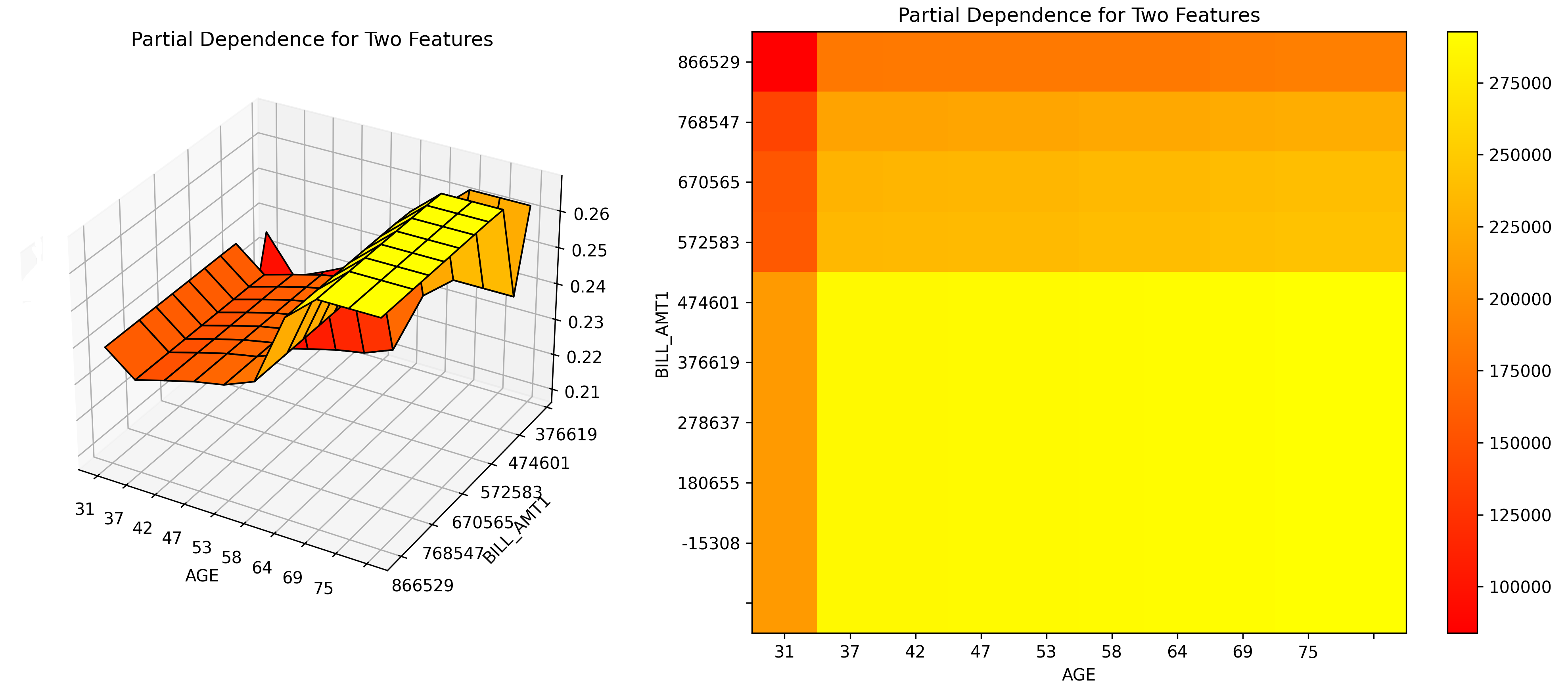
Explainer parameters:
sample_sizeSample size (default is
100 000).
max_featuresPartial Dependence Plot number of features (to see all features used by model set to
-1).
featuresPartial Dependence Plot feature list.
grid_resolutionPartial Dependence Plot observations per bin (number of equally spaced points used to create bins).
oor_grid_resolutionPartial Dependence Plot number of out of range bins.
quantile-bin-grid-resolutionPartial Dependence Plot quantile binning (total quantile points used to create bins).
plot_typePlot type to be used for Partial Dependence rendering -
heatmap,contour-3dorsurface-3d.
Explainer result directory description:
explainer_h2o_sonar_explainers_pd_2_features_explainer_PdFor2FeaturesExplainer_f710d221-64dc-4dc3-8e1f-2922d5a32cab
├── global_3d_data
│   ├── application_json
│   │   ├── data3d_feature_0_class_0.json
│   │   ├── data3d_feature_1_class_0.json
│   │   ├── data3d_feature_2_class_0.json
│   │   ├── data3d_feature_3_class_0.json
│   │   ├── data3d_feature_4_class_0.json
│   │   ├── data3d_feature_5_class_0.json
│   │   └── explanation.json
│   ├── application_json.meta
│   ├── application_vnd_h2oai_json_csv
│   │   ├── data3d_feature_0_class_0.csv
│   │   ├── data3d_feature_1_class_0.csv
│   │   ├── data3d_feature_2_class_0.csv
│   │   ├── data3d_feature_3_class_0.csv
│   │   ├── data3d_feature_4_class_0.csv
│   │   ├── data3d_feature_5_class_0.csv
│   │   └── explanation.json
│   └── application_vnd_h2oai_json_csv.meta
├── global_html_fragment
│   ├── text_html
│   │   ├── explanation.html
│   │   ├── image-0.png
│   │   ├── image-1.png
│   │   ├── image-2.png
│   │   ├── image-3.png
│   │   ├── image-4.png
│   │   └── image-5.png
│   └── text_html.meta
├── global_report
│   ├── text_markdown
│   │   ├── explanation.md
│   │   ├── image-0.png
│   │   ├── image-1.png
│   │   ├── image-2.png
│   │   ├── image-3.png
│   │   ├── image-4.png
│   │   └── image-5.png
│   └── text_markdown.meta
├── log
│   └── explainer_run_f710d221-64dc-4dc3-8e1f-2922d5a32cab.log
├── model_problems
│   └── problems_and_actions.json
├── result_descriptor.json
└── work
    ├── ...
    └── report.md
explainer_.../work/Data artifacts used to calculate the PD for 2 features.
Explanations created by the explainer:
global_3d_dataPer-feature tuple partial dependence explanation in JSon and CSV format.
global_reportPer-feature tuple partial dependence report in Markdown format.
global_html_fragmentPer-feature tuple partial dependence report as HTML snippet.
See also:
Residual Partial Dependence/Individual Conditional Expectations (PD/ICE) Explainer
The residual partial dependence plot (PDP) indicates which variables interact most with the error. Residuals are differences between observed and predicted values - the square of the difference between observed and predicted values is used. The residual partial dependence is created using normal partial dependence algorithm, while instead of prediction is used the residual. Individual Conditional Expectations plot (ICE) displays the interaction with error for an individual row of data when an input variable is toggled across its domain.
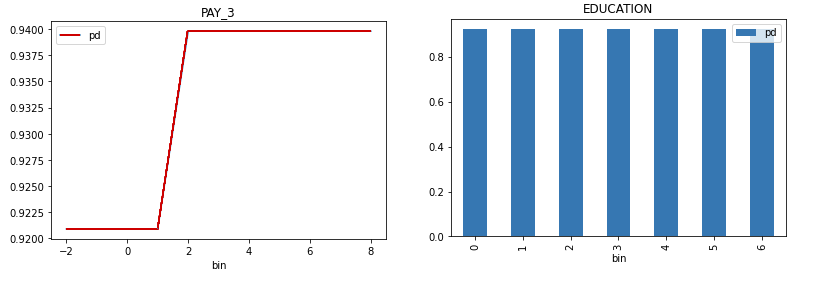
Explainer parameters:
sample_sizeSample size (default is
100 000).
max_featuresResidual Partial Dependence Plot number of features (to see all features used by model set to
-1).
featuresResidual Partial Dependence Plot feature list.
grid_resolutionResidual Partial Dependence Plot observations per bin (number of equally spaced points used to create bins).
oor_grid_resolutionResidual Partial Dependence Plot number of out of range bins.
centerCenter Partial Dependence Plot using ICE centered at 0.
sort_binsEnsure bin values sorting.
quantile-bin-grid-resolutionResidual Partial Dependence Plot quantile binning (total quantile points used to create bins).
quantile-binsPer-feature quantile binning.
Example: if choosing features
F1andF2, this parameter is{"F1": 2,"F2": 5}. Note, you can set all features to use the same quantile binning with the “Partial Dependence Plot quantile binning” parameter and then adjust the quantile binning for a subset of PDP features with this parameter.
histogramsEnable or disable histograms.
numcat_num_chartUnique feature values count driven Partial Dependence Plot binning and chart selection.
numcat_thresholdThreshold for Partial Dependence Plot binning and chart selection (<= threshold categorical, > threshold numeric).
Explainer result directory description:
tree explainer_h2o_sonar_explainers_residual_pd_ice_explainer_ResidualPdIceExplainer_40eb4da9-4a68-4782-9a70-22c6f7984846
explainer_h2o_sonar_explainers_residual_pd_ice_explainer_ResidualPdIceExplainer_40eb4da9-4a68-4782-9a70-22c6f7984846
├── global_html_fragment
│   ├── text_html
│   │   ├── explanation.html
│   │   ├── pd-class-1-feature-10.png
│   │   ├── pd-class-1-feature-1.png
│   │   ├── pd-class-1-feature-2.png
│   │   ├── pd-class-1-feature-3.png
│   │   ├── pd-class-1-feature-4.png
│   │   ├── pd-class-1-feature-5.png
│   │   ├── pd-class-1-feature-6.png
│   │   ├── pd-class-1-feature-7.png
│   │   ├── pd-class-1-feature-8.png
│   │   └── pd-class-1-feature-9.png
│   └── text_html.meta
├── global_partial_dependence
│   ├── application_json
│   │   ├── explanation.json
│   │   ├── pd_feature_0_class_0.json
│   │   ├── pd_feature_1_class_0.json
│   │   ├── pd_feature_2_class_0.json
│   │   ├── pd_feature_3_class_0.json
│   │   ├── pd_feature_4_class_0.json
│   │   ├── pd_feature_5_class_0.json
│   │   ├── pd_feature_6_class_0.json
│   │   ├── pd_feature_7_class_0.json
│   │   ├── pd_feature_8_class_0.json
│   │   └── pd_feature_9_class_0.json
│   └── application_json.meta
├── local_individual_conditional_explanation
│   ├── application_vnd_h2oai_json_datatable_jay
│   │   ├── explanation.json
│   │   ├── ice_feature_0_class_0.jay
│   │   ├── ice_feature_1_class_0.jay
│   │   ├── ice_feature_2_class_0.jay
│   │   ├── ice_feature_3_class_0.jay
│   │   ├── ice_feature_4_class_0.jay
│   │   ├── ice_feature_5_class_0.jay
│   │   ├── ice_feature_6_class_0.jay
│   │   ├── ice_feature_7_class_0.jay
│   │   ├── ice_feature_8_class_0.jay
│   │   ├── ice_feature_9_class_0.jay
│   │   └── y_hat.jay
│   └── application_vnd_h2oai_json_datatable_jay.meta
├── log
│   └── explainer_run_40eb4da9-4a68-4782-9a70-22c6f7984846.log
├── model_problems
│   └── problems_and_actions.json
├── result_descriptor.json
└── work
    ├── h2o_sonar-ice-dai-model-10.jay
    ├── h2o_sonar-ice-dai-model-1.jay
    ├── h2o_sonar-ice-dai-model-2.jay
    ├── h2o_sonar-ice-dai-model-3.jay
    ├── h2o_sonar-ice-dai-model-4.jay
    ├── h2o_sonar-ice-dai-model-5.jay
    ├── h2o_sonar-ice-dai-model-6.jay
    ├── h2o_sonar-ice-dai-model-7.jay
    ├── h2o_sonar-ice-dai-model-8.jay
    ├── h2o_sonar-ice-dai-model-9.jay
    ├── h2o_sonar-ice-dai-model.json
    ├── h2o_sonar-pd-dai-model.json
    └── mli_dataset_y_hat.jay
explainer_.../work/Data artifacts used to calculate residual PD and ICE.
Explanations created by the explainer:
global_partial_dependencePer-feature residual partial dependence explanation in JSon format.
local_individual_conditional_explanationPer-feature residual individual conditional expectation explanation in JSon and
datatableformat.
Residual PD/ICE explainer binning is the same as in case of Partial Dependence/Individual Conditional Expectations (PD/ICE) Explainer.
Problems reported by the explainer:
- Highest interaction between a feature and the error
The explainer reports a column with highest interaction with the error. This column (feature) should be investigated to determine whether it indicates a problem with the model.
Problem severity:
MEDIUM.
See also:
Disparate Impact Analysis (DIA) Explainer
Disparate Impact Analysis (DIA) is a technique that is used to evaluate fairness. Bias can be introduced to models during the process of collecting, processing, and labeling data as a result, it is important to determine whether a model is harming certain users by making a significant number of biased decisions. DIA typically works by comparing aggregate measurements of unprivileged groups to a privileged group. For instance, the proportion of the unprivileged group that receives the potentially harmful outcome is divided by the proportion of the privileged group that receives the same outcome - the resulting proportion is then used to determine whether the model is biased.
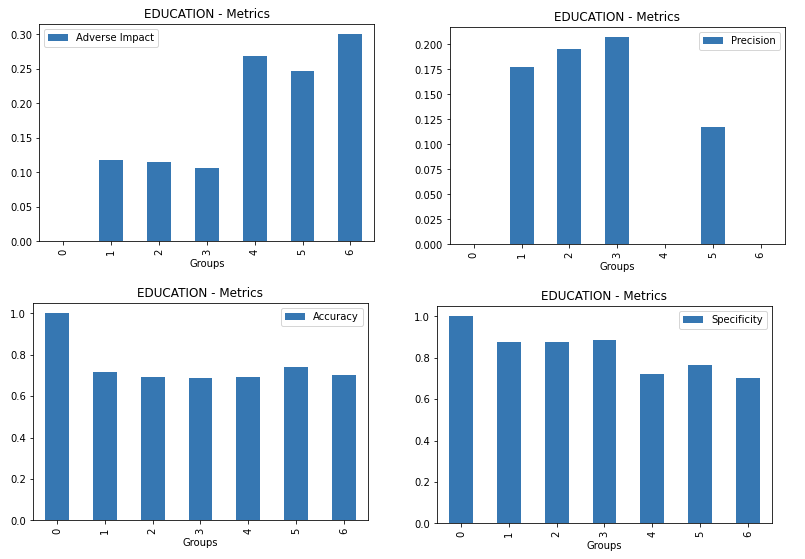
Explainer parameters:
dia_colsList of features for which to compute DIA.
cut_offCut off.
maximize_metricMaximize metric - one of
F1,F05,F2,MCC(default isF1).
sample_sizeSample size (default is
100 000).
max_cardinalityMax cardinality for categorical variables (default is
10).
min_cardinalityMin cardinality for categorical variables (default is
2).
num_cardMax cardinality for numeric variables to be considered categorical (default is
25).
Explainer result directory description:
explainer_h2o_sonar_explainers_dia_explainer_DiaExplainer_f1600947-05bc-4ae0-a396-d69dfca9d7c7
├── global_disparate_impact_analysis
│   ├── text_plain
│   │   └── explanation.txt
│   └── text_plain.meta
├── log
│   └── explainer_run_f1600947-05bc-4ae0-a396-d69dfca9d7c7.log
├── result_descriptor.json
└── work
    ├── dia_entity.json
    ├── EDUCATION
    │   ├── 0
    │   │   ├── cm.jay
    │   │   ├── disparity.jay
    │   │   ├── me_smd.jay
    │   │   └── parity.jay
    │   ├── 1
    │   │   ├── cm.jay
    │   │   ├── disparity.jay
    │   │   ├── me_smd.jay
    │   │   └── parity.jay
    │   ├── 2
    │   │   ├── cm.jay
    │   │   ├── disparity.jay
    │   │   ├── me_smd.jay
    │   │   └── parity.jay
    │   ├── 3
    │   │   ├── cm.jay
    │   │   ├── disparity.jay
    │   │   ├── me_smd.jay
    │   │   └── parity.jay
    │   ├── 4
    │   │   ├── cm.jay
    │   │   ├── disparity.jay
    │   │   ├── me_smd.jay
    │   │   └── parity.jay
    │   ├── 5
    │   │   ├── cm.jay
    │   │   ├── disparity.jay
    │   │   ├── me_smd.jay
    │   │   └── parity.jay
    │   ├── 6
    │   │   ├── cm.jay
    │   │   ├── disparity.jay
    │   │   ├── me_smd.jay
    │   │   └── parity.jay
    │   └── metrics.jay
    ├── MARRIAGE
    ...
    └── SEX
        ├── 0
        │   ├── cm.jay
        │   ├── disparity.jay
        │   ├── me_smd.jay
        │   └── parity.jay
        ├── 1
        │   ├── cm.jay
        │   ├── disparity.jay
        │   ├── me_smd.jay
        │   └── parity.jay
        └── metrics.jay
explainer_.../work/<feature name/Per feature directory with Disparate Impact Analysis metrics family - like disparity, parity, SMD and CM - for each feature value (group) in
datatableformat.
Explanations created by the explainer:
global_disparate_impact_analysisDisparate impact analysis explanation.
See also:
Morris sensitivity analysis Explainer
Morris sensitivity analysis (SA) explainer provides Morris sensitivity analysis based feature importance which is a measure of the contribution of an input variable to the overall predictions of the model. In applied statistics, the Morris method for global sensitivity analysis is a so-called one-step-at-a-time method (OAT), meaning that in each run only one input parameter is given a new value. This explainer is based based on InterpretML library - see interpret.ml.
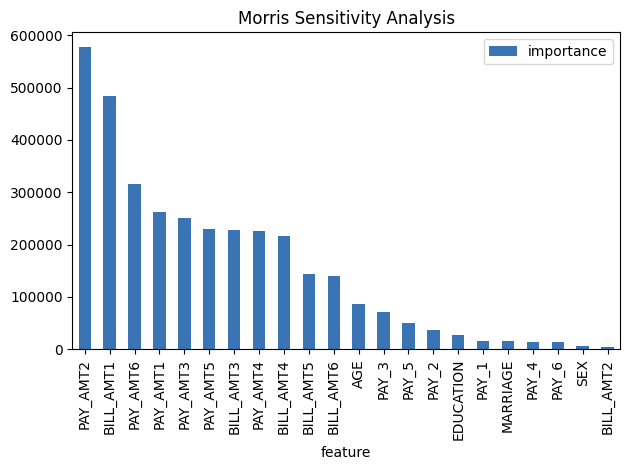
Package requirements:
install
interpretlibrary as it is not installed with H2O Sonar by default:
pip install interpret
Explainer parameters:
leakage_warning_thresholdThreshold for showing potential data leakage in the most important feature. Data leakage occurs when a feature influences the target column too much. High feature importance value means that the model you trained with this dataset will not be predicting the target based on all features but rather on just one. More about feature data leakage (also target leakage) at Target leakage H2O.ai Wiki.
Explainer result directory description:
explainer_h2o_sonar_explainers_morris_sa_explainer_MorrisSensitivityAnalysisExplainer_f4da0294-8c2b-4195-a567-bd4b65a01227
├── global_feature_importance
│   ├── application_json
│   │   ├── explanation.json
│   │   └── feature_importance_class_0.json
│   ├── application_json.meta
│   ├── application_vnd_h2oai_json_datatable_jay
│   │   ├── explanation.json
│   │   └── feature_importance_class_0.jay
│   └── application_vnd_h2oai_json_datatable_jay.meta
├── global_html_fragment
│   ├── text_html
│   │   ├── explanation.html
│   │   └── fi-class-0.png
│   └── text_html.meta
├── log
│   └── explainer_run_f4da0294-8c2b-4195-a567-bd4b65a01227.log
├── result_descriptor.json
└── work
Explanations created by the explainer:
global_feature_importanceFeature interactions in JSon format.
global_html_fragmentFeature interactions in HTML format.
Problems reported by the explainer:
- Potential feature importance leak
The explainer reports a column with potential feature importance leak. Such column should be investigated and in case of the leak either removed from the dataset or weighted down in the model training process.
Problem severity:
HIGH.
See also:
Friedman’s H-statistic Explainer
The explainer provides implementation of Friedman’s H-statistic feature interactions. The statistic is 0 when there is no interaction at all and 1 if all the variance of the predict function is explained by a sum of the partial dependence functions. More information about Friedman’s H-Statistic method is available at Theory: Friedman’s H-statistic.
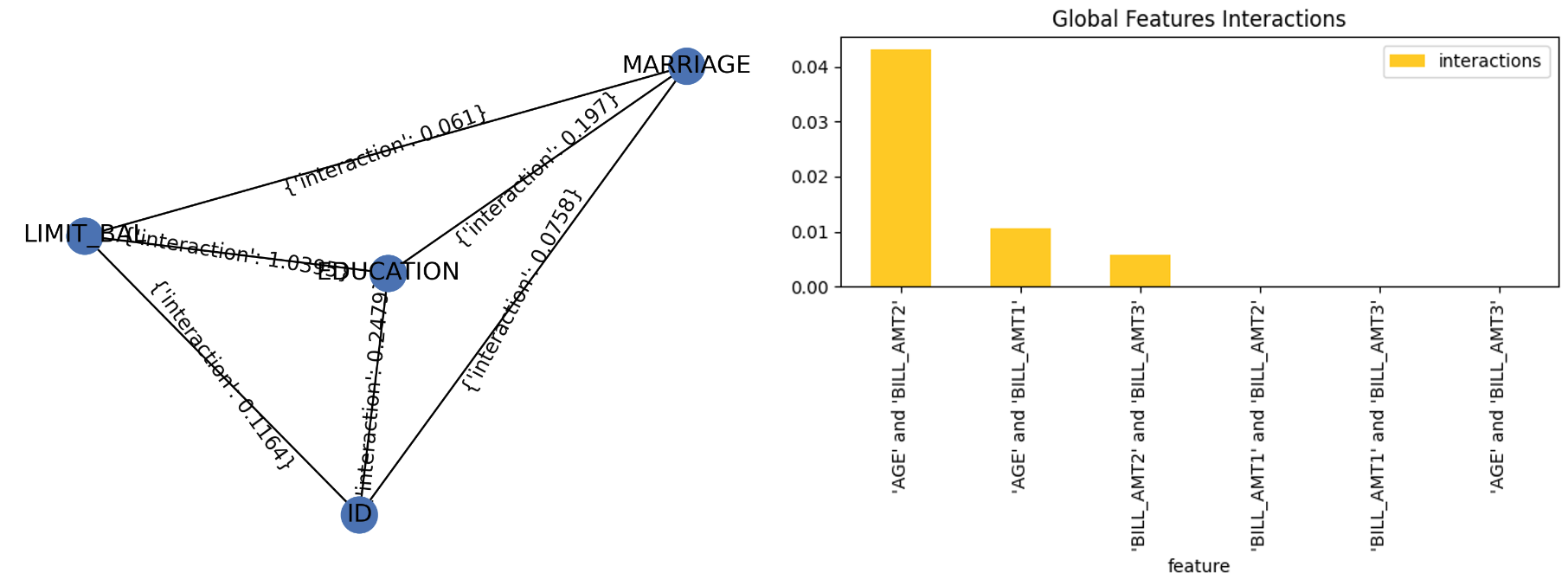
Explainer parameters:
features_numberMaximum number of features for which to calculate Friedman’s H-statistic (must be at least
2).
featuresList of features for which to calculate Friedman’s H-statistic (must be at least
2, overridesfeatures_number).
grid_resolutionFriedman’s H-statistic observations per bin (number of equally spaced points used to create bins).
Explainer result directory description:
explainer_h2o_sonar_explainers_friedman_h_statistic_explainer_FriedmanHStatisticExplainer_579aa93f-4f80-446f-ba21-815304ccee9c
├── global_feature_importance
│   ├── application_json
│   │   ├── explanation.json
│   │   └── feature_importance_class_0.json
│   ├── application_json.meta
│   ├── application_vnd_h2oai_json_csv
│   │   ├── explanation.json
│   │   └── feature_importance_class_0.csv
│   ├── application_vnd_h2oai_json_csv.meta
│   ├── application_vnd_h2oai_json_datatable_jay
│   │   ├── explanation.json
│   │   └── feature_importance_class_0.jay
│   └── application_vnd_h2oai_json_datatable_jay.meta
├── global_html_fragment
│   ├── text_html
│   │   ├── explanation.html
│   │   └── fi-class-0.png
│   └── text_html.meta
├── global_report
│   ├── text_markdown
│   │   ├── explanation.md
│   │   └── image.png
│   └── text_markdown.meta
├── log
│   └── explainer_run_579aa93f-4f80-446f-ba21-815304ccee9c.log
├── result_descriptor.json
└── work
    ├── image.png
    └── report.md
Explanations created by the explainer:
global_feature_importanceFeature interactions in JSon, CSV and
datatableformats.
global_html_fragmentFeature interactions in HTML format.
global_reportFeature interactions in Markdown format.
See also:
Dataset and Model Insights Explainer
The explainer checks the dataset and model for various issues. For example, it provides problems and actions for missing values in the target column and a low number of unique values across columns of a dataset.
Explainer result directory description:
explainer_h2o_sonar_explainers_dataset_and_model_insights_DatasetAndModelInsights_e222f392-9a55-41fb-ab51-d45cc6bd35db/
├── global_text_explanation
│   ├── text_plain
│   │   └── explanation.txt
│   └── text_plain.meta
├── log
│   └── explainer_run_e222f392-9a55-41fb-ab51-d45cc6bd35db.log
├── model_problems
│   └── problems_and_actions.json
├── result_descriptor.json
└── work
Problems reported by the explainer:
- Missing values in the target column
The explainer reports missing values in the target column. Rows with the missing values in the target column should be removed from the dataset.
Problem severity:
LOW-HIGH(based on the number of impacted columns).
- Features with potentially insufficient number of unique values
The explainer reports columns with 1 unique value only. Such columns should be either removed from the dataset or its missing values (if any) replaced with valid values.
Problem severity:
LOW-HIGH(based on the number of impacted columns).
See also:
Adversarial Similarity Explainer
This explainer is based on the adversarial similarity H2O Model Validation test.
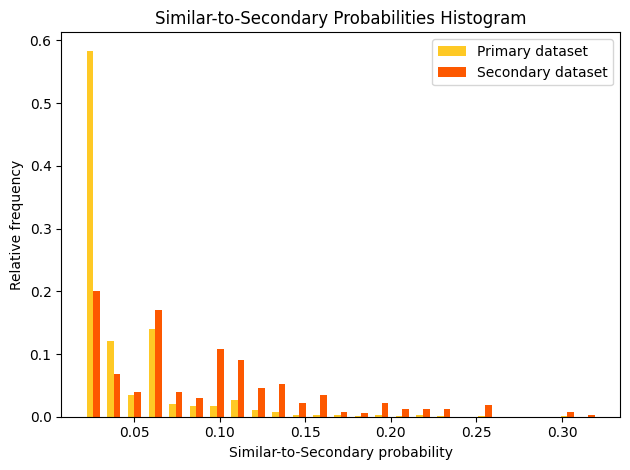
Adversarial similarity refers to a validation test that assists in observing feature distribution of two different datasets can indicate similarity or dissimilarity. An adversarial similarity test can be performed rather than going over all the features individually to observe the differences. During an adversarial similarity test, decision tree algorithms are leveraged to find similar or dissimilar rows between the train dataset and any dataset with the same train columns.
Explainer parameters:
worker_connection_keyOptional connection ID of the Driverless AI worker configured in the H2O Sonar configuration. Supported are Driverless AI servers hosted by H2O AIEM or H2O Enterprise Steam, or Driverless AI servers that use username and password authentication.
shapley_valuesDetermines whether to compute Shapley values for the model used to analyze the similarity between the Primary and Secondary Dataset. Test uses the generated Shapley values to create an array of visual metrics that provide valuable insights into the contribution of individual features to the overall model performance.
drop_colsDefines the columns to drop during model training.
The explainer can be run using the Python API as follows:
# configure Driverless AI server to serve as a host of artifacts (datasets, models) and/or worker
DAI_CONNECTION = h2o_sonar_config.ConnectionConfig(
   key="local-driverless-ai-server",  # ID is generated from the connection name (NCName)
   connection_type=h2o_sonar_config.ConnectionConfigType.DRIVERLESS_AI_AIEM.name,
   name="My H2O AIEM hosted Driverless AI ",
   description="Driverless AI server hosted by H2O Enterprise AIEM.",
   server_url="https://enginemanager.cloud.h2o.ai/",
   server_id="new-dai-engine-42",
   environment_url="https://cloud.h2o.ai",
   username="firstname.lastname@h2o.ai",
   token=os.getenv(KEY_AIEM_REFRESH_TOKEN_CLOUD),
   token_use_type=h2o_sonar_config.TokenUseType.REFRESH_TOKEN.name,
)
# add the connection to the H2O Sonar configuration
h2o_sonar_config.config.add_connection(DAI_CONNECTION)

# run the explainer (model and datasets provided as handles as they are hosted by the Driverless AI server)
interpretation = interpret.run_interpretation(
   model=f"resource:connection:{DAI_CONNECTION.key}:key:7965e2ea-f898-11ed-b979-106530ed5ceb",
   dataset=f"resource:connection:{DAI_CONNECTION.key}:key:8965e2ea-f898-11ed-b979-106530ed5ceb",
   testset=f"resource:connection:{DAI_CONNECTION.key}:key:9965e2ea-f898-11ed-b979-106530ed5ceb",
   target_col="Weekly_Sales",
   explainers=[
      commons.ExplainerToRun(
            explainer_id=AdversarialSimilarityExplainer.explainer_id(),
            params={
               "worker_connection_key": DAI_CONNECTION.key,
               "shapley_values": False,
            },
      )
   ],
   results_location="./h2o-sonar-results",
)
The explainer can be run using the command line interface (CLI) as follows:
h2o-sonar run interpretation
--explainers h2o_sonar.explainers.adversarial_similarity_explainer.AdversarialSimilarityExplainer
--explainers-pars '{
   "h2o_sonar.explainers.adversarial_similarity_explainer.AdversarialSimilarityExplainer": {
      "worker_connection_key": "local-driverless-ai-server",
      "shapley_values": false,
   }
}'
--model "resource:connection:local-driverless-ai-server:key:7965e2ea-f898-11ed-b979-106530ed5ceb"
--dataset "resource:connection:local-driverless-ai-server:key:695f5d5e-f898-11ed-b979-106530ed5ceb"
--testset "resource:connection:local-driverless-ai-server:key:695df75c-f898-11ed-b979-106530ed5ceb"
--target-col "Weekly_Sales"
--results-location "./h2o-sonar-results"
--config-path "./h2o-sonar-config.json"
--encryption-key "secret-key-to-decrypt-encrypted-config-fields"
Explainer result directory description:
explainer_h2o_sonar_explainers_adversarial_similarity_explainer_AdversarialSimilarityExplainer_d473b5c0-02a3-4971-905a-adb9841a0958
├── global_grouped_bar_chart
│   ├── application_vnd_h2oai_json_datatable_jay
│   │   ├── explanation.json
│   │   └── feature_importance_class_0.jay
│   └── application_vnd_h2oai_json_datatable_jay.meta
├── global_html_fragment
│   ├── text_html
│   │   ├── explanation.html
│   │   └── fi-class-0.png
│   └── text_html.meta
├── global_work_dir_archive
│   ├── application_zip
│   │   └── explanation.zip
│   └── application_zip.meta
├── log
│   └── explainer_run_d473b5c0-02a3-4971-905a-adb9841a0958.log
├── model_problems
│   └── problems_and_actions.json
├── result_descriptor.json
└── work
Explanations created by the explainer:
global_grouped_bar_chartSimilar-to-secondary probabilities histogram in the
datatableformat.
global_html_fragmentAdversarial similarity in the HTML format.
global_work_dir_archiveAll explanations created by the explainer stored in a ZIP archive.
See also:
Backtesting Explainer
This explainer is based on the backtesting H2O Model Validation test.
A backtesting test enables you to assess the robustness of a model using the existing historical training data through a series of iterative training where training data is used from its recent to oldest collected values.
Explainer performs a backtesting test by fitting a predictive model with a training dataset to later assess the model with a separate test dataset where the test dataset does not overlap with the training data. Frequently, the training data is collected over time and has an explicit time dimension. In such cases, utilizing the most recent dataset points for the model test dataset is common practice, as it better mimics a real model application.
By applying a backtesting test to a model, we can refit the model multiple times, where every time, we use shorter time spans of the training data while using a portion of that data as test data. As a result, the test dataset is replaced with a series of values over time.
A backtesting test enables you to:
Understand the variance of the model accuracy
Understand and visualize how the model accuracy develops over time
Identify potential reasons for any performance issues with the modeling approach in the past (for example, problems around data collection)
Each iteration during backtesting, the model is fully refitted, which includes a rerun of feature engineering and feature selection. Not entirely refitting during each iteration results in an incorrect backtesting outcome because the next iteration would have selected features based on the entire data. An incorrect backtesting outcome also leads to data leakage where information from the future is explicitly or implicitly reflected in the current variables.
Explainer parameters:
worker_connection_keyThe connection ID of the Driverless AI worker configured in the H2O Sonar configuration. Supported are Driverless AI servers hosted by H2O AIEM or H2O Enterprise Steam, or Driverless AI servers that use username and password authentication.
time_colDefines the time column in the primary dataset that the explainer utilizes to split the primary dataset (training dataset) during the backtesting test.
split_typeSplit type - either ‘auto’ (explainer determines the split dates, which create the backtesting experiments) or ‘custom’ (you determine the split dates, which create the backtesting experiments).
number_of_splitsDefines the number of dates (splits) the explainer utilizes for the dataset splitting and model refitting process during the validation test. The explainer sets the specified number of dates in the past while being equally apart from one another to generate appropriate dataset splits.
number_of_forecast_periodsNumber of the forest periods.
forecast_period_unitForecast period unit.
number_of_training_periodsNumber of training periods.
training_period_unitTraining period unit.
custom_datesCustom dates.
plot_typePlot type - one of
heatmap,contour-3dorsurface-3d.
The explainer can be run using the Python API as follows:
# configure Driverless AI server to serve as a host of artifacts (datasets, models) and/or worker
DAI_CONNECTION = h2o_sonar_config.ConnectionConfig(
   key="local-driverless-ai-server",  # ID is generated from the connection name (NCName)
   connection_type=h2o_sonar_config.ConnectionConfigType.DRIVERLESS_AI_AIEM.name,
   name="My H2O AIEM hosted Driverless AI ",
   description="Driverless AI server hosted by H2O Enterprise AIEM.",
   server_url="https://enginemanager.cloud.h2o.ai/",
   server_id="new-dai-engine-42",
   environment_url="https://cloud.h2o.ai",
   username="firstname.lastname@h2o.ai",
   token=os.getenv(KEY_AIEM_REFRESH_TOKEN_CLOUD),
   token_use_type=h2o_sonar_config.TokenUseType.REFRESH_TOKEN.name,
)
# add the connection to the H2O Sonar configuration
h2o_sonar_config.config.add_connection(DAI_CONNECTION)

# run the explainer (model and datasets provided as handles as they are hosted by the Driverless AI server)
interpretation = interpret.run_interpretation(
   model=f"resource:connection:{DAI_CONNECTION.key}:key:7965e2ea-f898-11ed-b979-106530ed5ceb",
   dataset=f"resource:connection:{DAI_CONNECTION.key}:key:8965e2ea-f898-11ed-b979-106530ed5ceb",
   target_col="Weekly_Sales",
   explainers=[
      commons.ExplainerToRun(
            explainer_id=BacktestingExplainer.explainer_id(),
            params={
               "worker_connection_key": DAI_CONNECTION.key,
               "time_col": "Date",
            },
      )
   ],
   results_location="./h2o-sonar-results",
)
The explainer can be run using the command line interface (CLI) as follows:
h2o-sonar run interpretation
--explainers h2o_sonar.explainers.backtesting_explainer.BacktestingExplainer
--explainers-pars '{
   "h2o_sonar.explainers.backtesting_explainer.BacktestingExplainer": {
      "worker_connection_key": "local-driverless-ai-server",
      "shapley_values": false,
   }
}'
--model "resource:connection:local-driverless-ai-server:key:7965e2ea-f898-11ed-b979-106530ed5ceb"
--dataset "resource:connection:local-driverless-ai-server:key:695f5d5e-f898-11ed-b979-106530ed5ceb"
--target-col "Weekly_Sales"
--results-location "./h2o-sonar-results"
--config-path "./h2o-sonar-config.json"
--encryption-key "secret-key-to-decrypt-encrypted-config-fields"
Explainer result directory description:
explainer_h2o_sonar_explainers_backtesting_explainer_BacktestingExplainer_ea4f567b-79e3-4295-8bb5-c0f0bb45d21b
├── global_3d_data
│   ├── application_json
│   │   ├── data3d_feature_0_class_0.json
│   │   └── explanation.json
│   ├── application_json.meta
│   ├── application_vnd_h2oai_json_csv
│   │   ├── data3d_feature_0_class_0.csv
│   │   └── explanation.json
│   └── application_vnd_h2oai_json_csv.meta
├── global_html_fragment
│   ├── text_html
│   │   ├── explanation.html
│   │   └── heatmap.png
│   └── text_html.meta
├── global_work_dir_archive
│   ├── application_zip
│   │   └── explanation.zip
│   └── application_zip.meta
├── log
│   └── explainer_run_ea4f567b-79e3-4295-8bb5-c0f0bb45d21b.log
├── model_problems
│   └── problems_and_actions.json
├── result_descriptor.json
└── work
   ├── explanation.html
   └── heatmap.png
Explanations created by the explainer:
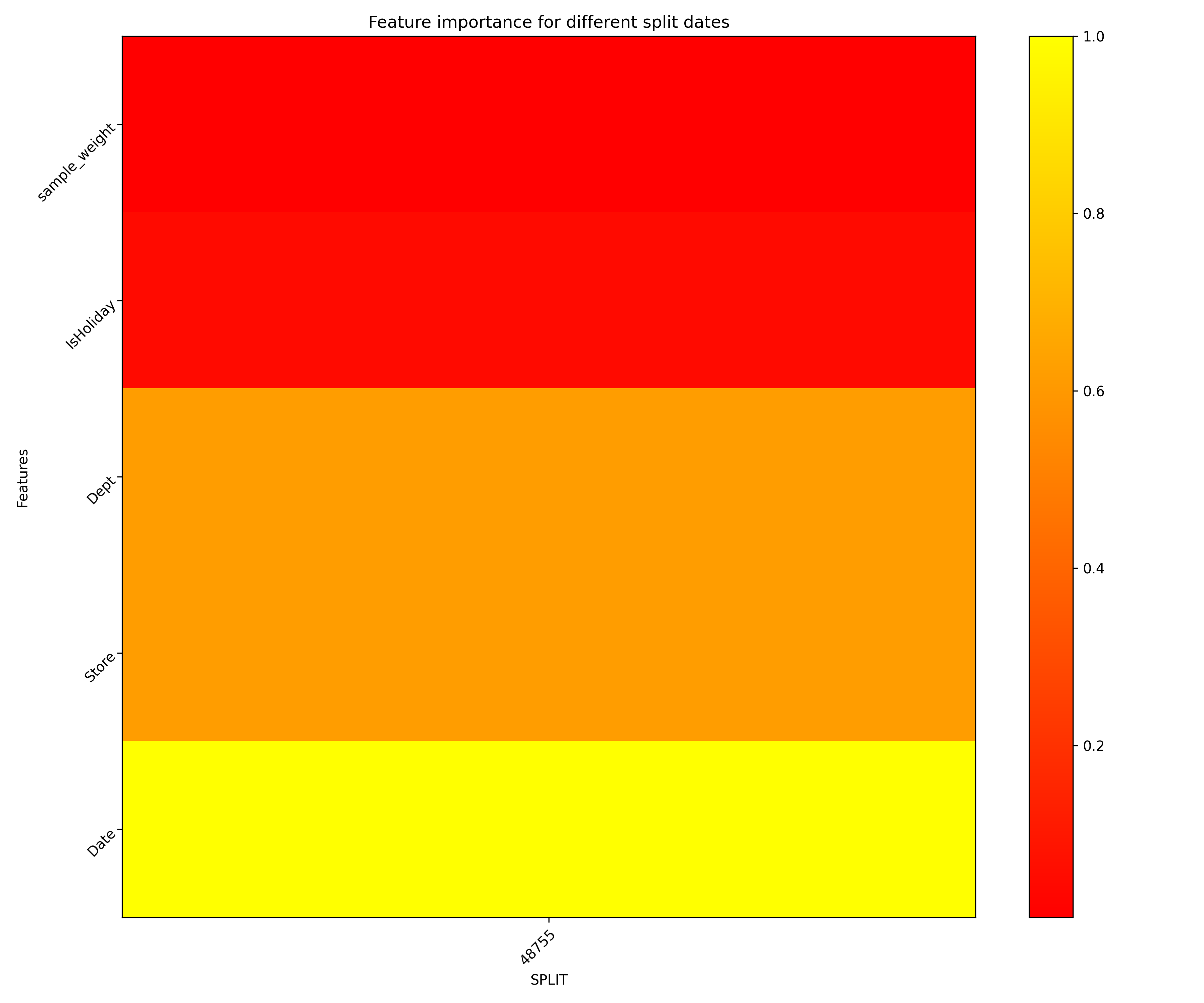
global_3d_dataFeature importantance for different split dates in JSon and CSV formats.
global_html_fragmentFeature importantance for different split dates in the HTML format.
global_work_dir_archiveAll explanations created by the explainer stored in a ZIP archive.
See also:
Calibration Score Explainer
This explainer is based on the calibration score H2O Model Validation test.
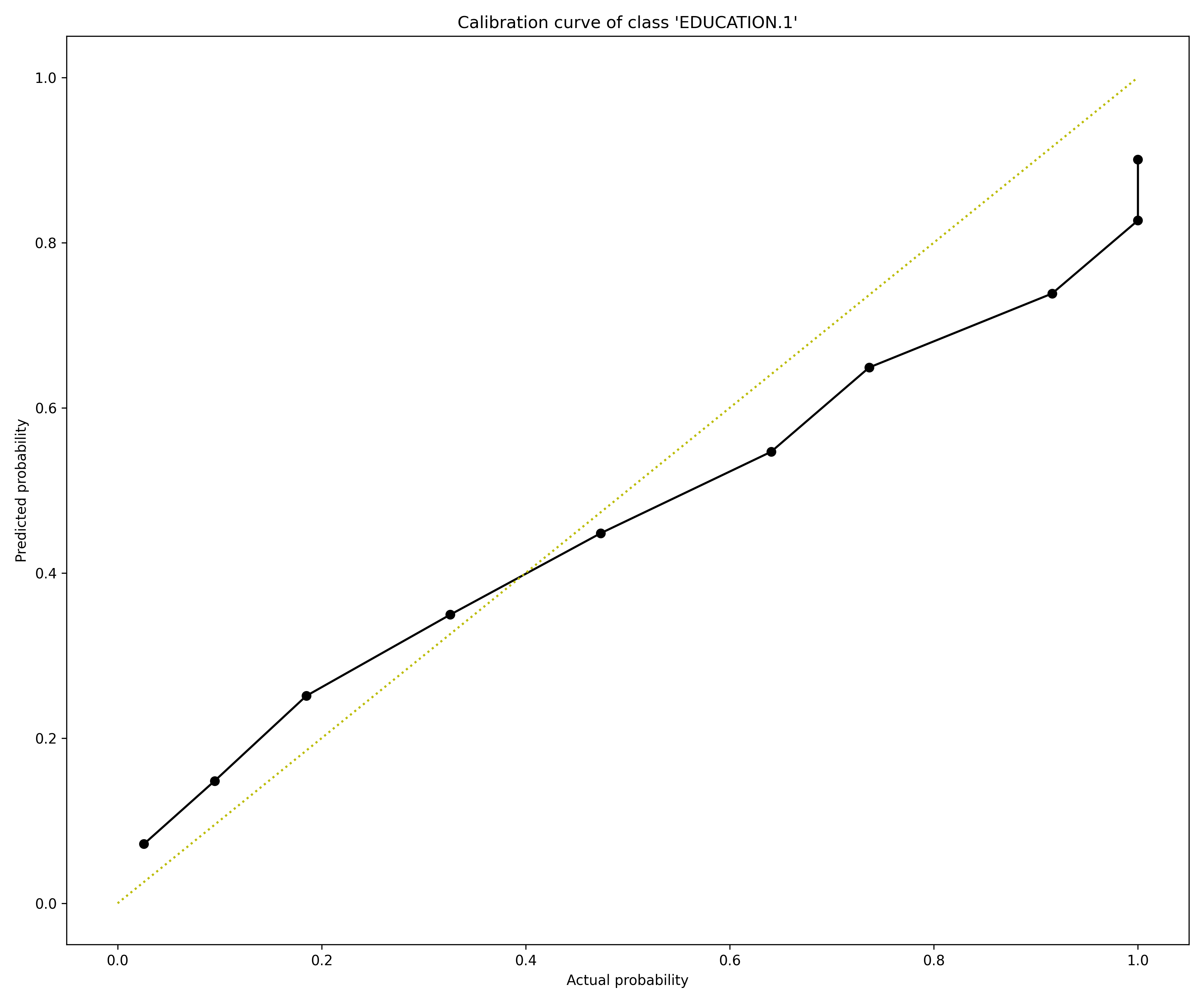
A calibration score test enables you to assess how well the scores generated by a classification model align with the model’s probabilities. In other words, the validation test can estimate how good the generated probabilities can be for a test dataset with real-world examples. In the case of a multi-class model, the validation test repeats the test for each target class.
Explainer utilizes the Brier score to assess the model calibration of each target class. The Brier score ranges from 0 to 1, where 0 indicates a perfect calibration. After the test, explainer assigns a Brier score to the target class (or all target classes in the case of a multi-class model).
In addition, the test generates a calibration score graph that visualizes the calibration curves to identify the ranges, directions, and magnitudes of probabilities that are off. H2O Model Validation adds a perfect calibration line (a diagonal line) for reference in this calibration score graph. Estimating how well the model is calibrated to real-world data is crucial when a classification model is used not only for complex decisions but supplies the probabilities for downstream tasks, such as pricing decisions or propensity to churn estimations.
Explainer parameters:
worker_connection_keyThe connection ID of the Driverless AI worker configured in the H2O Sonar configuration. Supported are Driverless AI servers hosted by H2O AIEM or H2O Enterprise Steam, or Driverless AI servers that use username and password authentication.
number_of_binsDefines the number of bins the explainer utilizes to divide the primary dataset.
bin_strategyDefines the binning strategy - one of
uniformorquantile- the explainer utilizes to bin the primary dataset.
The explainer can be run using the Python API as follows:
# configure Driverless AI server to serve as a host of artifacts (datasets, models) and/or worker
DAI_CONNECTION = h2o_sonar_config.ConnectionConfig(
   key="local-driverless-ai-server",  # ID is generated from the connection name (NCName)
   connection_type=h2o_sonar_config.ConnectionConfigType.DRIVERLESS_AI_AIEM.name,
   name="My H2O AIEM hosted Driverless AI ",
   description="Driverless AI server hosted by H2O Enterprise AIEM.",
   server_url="https://enginemanager.cloud.h2o.ai/",
   server_id="new-dai-engine-42",
   environment_url="https://cloud.h2o.ai",
   username="firstname.lastname@h2o.ai",
   token=os.getenv(KEY_AIEM_REFRESH_TOKEN_CLOUD),
   token_use_type=h2o_sonar_config.TokenUseType.REFRESH_TOKEN.name,
)
# add the connection to the H2O Sonar configuration
h2o_sonar_config.config.add_connection(DAI_CONNECTION)

# run the explainer (model and datasets provided as handles as they are hosted by the Driverless AI server)
interpretation = interpret.run_interpretation(
   model=f"resource:connection:{DAI_CONNECTION.key}:key:7965e2ea-f898-11ed-b979-106530ed5ceb",
   dataset=f"resource:connection:{DAI_CONNECTION.key}:key:8965e2ea-f898-11ed-b979-106530ed5ceb",
   target_col="Weekly_Sales",
   explainers=[
      commons.ExplainerToRun(
            explainer_id=CalibrationScoreExplainer.explainer_id(),
            params={
               "worker_connection_key": DAI_CONNECTION.key,
            },
      )
   ],
   results_location="./h2o-sonar-results",
)
The explainer can be run using the command line interface (CLI) as follows:
h2o-sonar run interpretation
--explainers h2o_sonar.explainers.calibration_score_explainer.CalibrationScoreExplainer
--explainers-pars '{
   "h2o_sonar.explainers.calibration_score_explainer.CalibrationScoreExplainer": {
      "worker_connection_key": "local-driverless-ai-server",
   }
}'
--model "resource:connection:local-driverless-ai-server:key:7965e2ea-f898-11ed-b979-106530ed5ceb"
--dataset "resource:connection:local-driverless-ai-server:key:695f5d5e-f898-11ed-b979-106530ed5ceb"
--target-col "Weekly_Sales"
--results-location "./h2o-sonar-results"
--config-path "./h2o-sonar-config.json"
--encryption-key "secret-key-to-decrypt-encrypted-config-fields"
Explainer result directory description:
explainer_h2o_sonar_explainers_calibration_score_explainer_CalibrationScoreExplainer_b02fc087-110d-4b80-b1ca-3bb801bb7b2d
├── global_frame
│   ├── application_vnd_h2oai_datatable_jay
│   │   └── explanation.jay
│   └── application_vnd_h2oai_datatable_jay.meta
├── global_html_fragment
│   ├── text_html
│   │   ├── calibration_curve_0.png
│   │   ├── calibration_curve_1.png
│   │   ├── calibration_curve_2.png
│   │   ├── calibration_curve_3.png
│   │   ├── calibration_curve_4.png
│   │   ├── calibration_curve_5.png
│   │   ├── calibration_curve_6.png
│   │   └── explanation.html
│   └── text_html.meta
├── global_work_dir_archive
│   ├── application_zip
│   │   └── explanation.zip
│   └── application_zip.meta
├── log
│   └── explainer_run_b02fc087-110d-4b80-b1ca-3bb801bb7b2d.log
├── model_problems
│   └── problems_and_actions.json
├── result_descriptor.json
└── work
   ├── brier_scores.csv
   ├── calibration_curve_0.png
   ├── calibration_curve_1.png
   ├── calibration_curve_2.png
   ├── calibration_curve_3.png
   ├── calibration_curve_4.png
   ├── calibration_curve_5.png
   ├── calibration_curve_6.png
   ├── calibration_curves.csv
   ├── explanation.html
   └── mv_result.json
Explanations created by the explainer:
global_frameCalibration curve data for all classes in the
datatableformat.
global_html_fragmentCalibration score in the HTML format.
global_work_dir_archiveAll explanations created by the explainer stored in a ZIP archive.
See also:
Drift Detection Explainer
This explainer is based on the drift detection H2O Model Validation test.
Drift detection refers to a validation test that enables you to identify changes in the distribution of variables in your model’s input data, preventing model performance degradation.
The explainer performs drift detection using the train and another dataset captured at different times to assess how data has changed over time. The Population Stability Index (PSI) formula is applied to each variable to measure how much the variable has shifted in distribution over time. PSI is applied to numerical and categorical columns and not date columns.
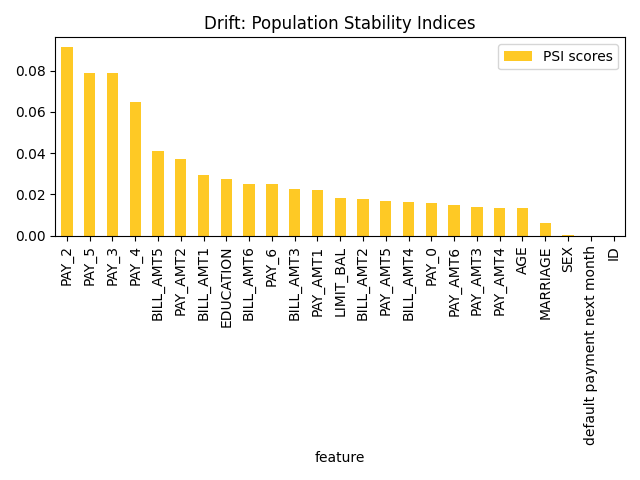
Explainer parameters:
worker_connection_keyOptional connection ID of the Driverless AI worker configured in the H2O Sonar configuration. Supported are Driverless AI servers hosted by H2O AIEM or H2O Enterprise Steam, or Driverless AI servers that use username and password authentication.
drift_thresholdDrift threshold - Problem is reported by the explainer if the drift is bigger than the threshold.
drop_colsDefines the columns to drop during the validation test. Typically drop columns refer to columns that can indicate a drift without an impact on the model, like columns not used by the model, record IDs, time columns, etc.
The explainer can be run using the Python API as follows:
# run the explainer (model and datasets provided as handles as they are hosted by the Driverless AI server)
interpretation = interpret.run_interpretation(
   # dataset might be either local or hosted by the Driverless AI server (model is not required)
   dataset="./dataset-train.csv",
   testset="./dataset-test.csv",
   model=None,
   target_col="PROFIT",
   explainers=[DriftDetection.explainer_id()],
   results_location="./h2o-sonar-results",
)
The explainer, which explains Driverless AI datasets hosted by H2O AIEM, can be run using the command line interface (CLI) as follows:
# When H2O Sonar loads or saves the library configuration it uses the encryption key
# to protect sensitive data - like passwords or tokens. Therefore it is convenient
# to export the encryption key as an environment variable so that it can be used
# by the library.

export H2O_SONAR_ENCRYPTION_KEY="m1-s3cr3t-k3y"

# h2o-sonar-config.json H2O Sonar configuration with H2O AIEM hosted Driverless AI
# connection. Note that the "token" is encrypted using the encryption key.

{
   "connections": [
      {
            "key": "my-aiem-hosted-dai-connection",
            "connection_type": "DRIVERLESS_AI_AIEM",
            "name": "My H2O AIEM hosted Driverless AI ",
            "description": "Driverless AI server hosted by H2O Enterprise AIEM.",
            "auth_server_url": "",
            "environment_url": "https://cloud.h2o.ai",
            "server_url": "https://enginemanager.cloud.h2o.ai/",
            "server_id": "new-dai-engine-42",
            "realm_name": "",
            "client_id": "",
            "token": {
               "encrypted": "gAAAAABlG-UU-...Z2iriJztlEG0l2g2rPo8RIoYiNOJMQ_CLZVp"
            },
            "token_use_type": "REFRESH_TOKEN",
            "username": "firstname.lastname@h2o.ai",
            "password": {
               "encrypted": ""
            }
      }
   ],
}

# h2o-sonar-args-run-interpretation.json file with CLI parameters stored as JSon file.
# Instead of specifying many parameters on the command line interface, it is convenient
# to store all the parameters as (reusable) JSon file.

{
   "dataset": "resource:connection:my-aiem-hosted-dai-connection:key:fb2029e6-595d-11ee-896f-6e441ddba243",
   "testset": "resource:connection:my-aiem-hosted-dai-connection:key:gb2029e6-595d-11ee-896f-6e441ddba243",
   "model": null,
   "target_col": "Weekly_Sales",
   "explainers": [
      {
            "id": "h2o_sonar.explainers.drift_explainer.DriftDetectionExplainer",
            "params": {
               "drift_threshold": 0.05,
               "worker_connection_key": "my-aiem-hosted-dai-connection"
            }
      }
   ],
   "results_location": "./results"
}

# Interperation can be run using the h2o-sonar CLI as follows:

h2o-sonar run interpretation \
   --args-as-json-location h2o-sonar-args-run-interpretation.json \
   --config-path h2o-sonar-config.json
Explainer result directory description:
explainer_h2o_sonar_explainers_drift_explainer_DriftDetectionExplainer_fee36f5d-64fb-46b3-a46a-7bbcb6007476
├── global_feature_importance
│   ├── application_json
│   │   ├── explanation.json
│   │   └── feature_importance_class_0.json
│   ├── application_json.meta
│   ├── application_vnd_h2oai_json_datatable_jay
│   │   ├── explanation.json
│   │   └── feature_importance_class_0.jay
│   └── application_vnd_h2oai_json_datatable_jay.meta
├── global_html_fragment
│   ├── text_html
│   │   ├── explanation.html
│   │   └── fi-class-0.png
│   └── text_html.meta
├── global_work_dir_archive
│   ├── application_zip
│   │   └── explanation.zip
│   └── application_zip.meta
├── log
│   └── explainer_run_fee36f5d-64fb-46b3-a46a-7bbcb6007476.log
├── model_problems
│   └── problems_and_actions.json
├── result_descriptor.json
└── work
Explanations created by the explainer:
global_feature_importancePopulation stability indices in JSon and
datatableformat.
global_html_fragmentPopulation stability indices in the HTML format.
global_work_dir_archiveAll explanations created by the explainer stored in a ZIP archive.
See also:
Segment Performance Explainer
This explainer is based on the segment performance H2O Model Validation test.
A segment performance test lets you explore a model’s data subsets (segments) that diverge from average scores. In other words, a segment performance test allows you to discover which data points (segments) the model struggles, outperformance, and performs with when generating accurate predictions.
To run a segment performance test on a model, explainer utilizes a provided dataset to generate model predictions to assess their accuracy. Explainer splits the dataset into segments by the bins of values of every variable and every pair of variables to generate results around the ability of the model to produce accurate predictions with different data segments. These results are embedded into a bubble graph that explainer generates that enables you to observe and explore data segments the model struggles, outperformance, and performs with when generating accurate predictions. For each segment, explainer calculates its size of it relative to the size of the dataset and estimates the error the model makes on the corresponding segment.
Exploring and identifying data segments in a model that do not perform as expected can lead to decisions on how you preprocess your data.
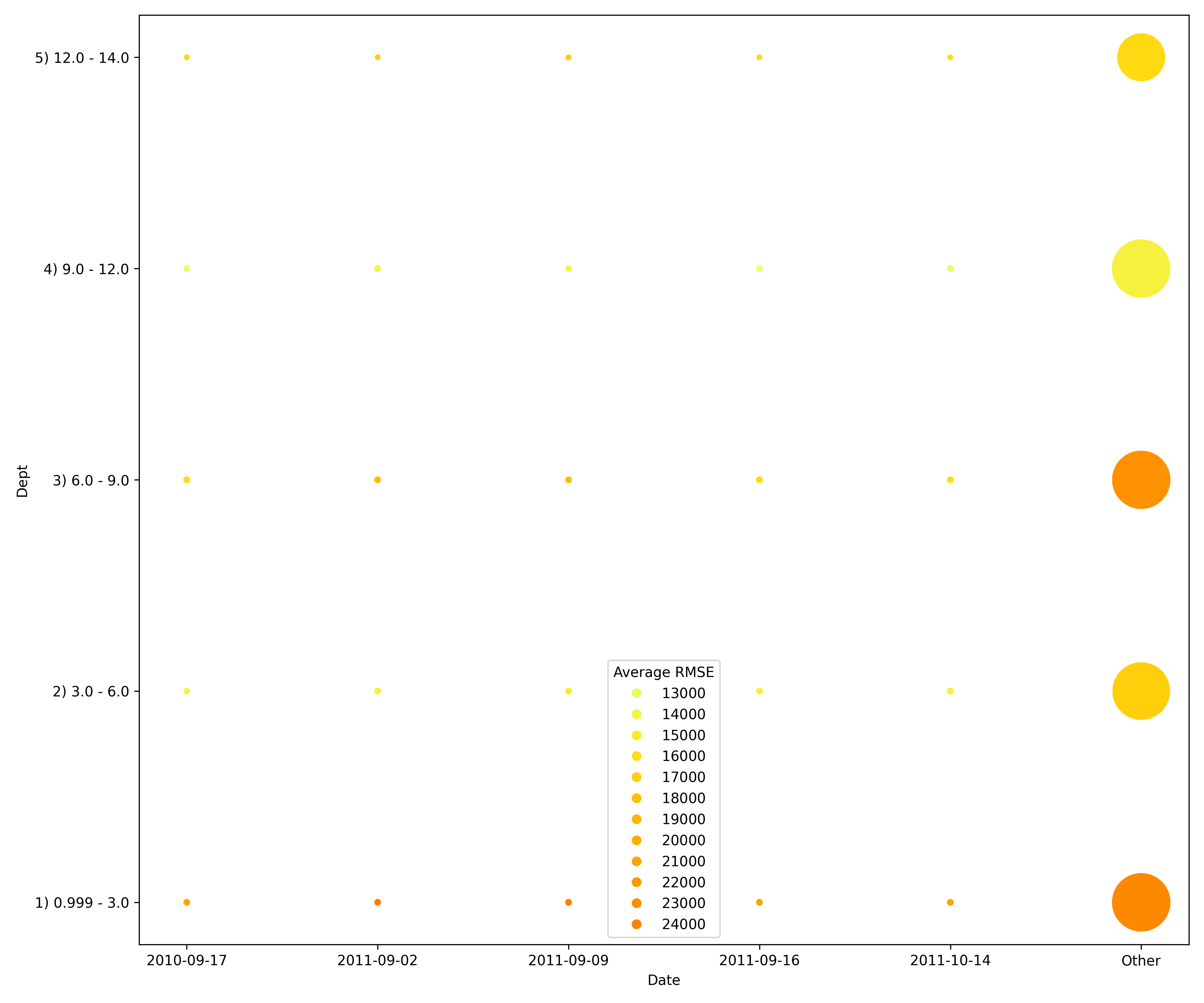
Explainer parameters:
worker_connection_keyThe connection ID of the Driverless AI worker configured in the H2O Sonar configuration. Supported are Driverless AI servers hosted by H2O AIEM or H2O Enterprise Steam, or Driverless AI servers that use username and password authentication.
number_of_binsDefines the number of bins the explainer utilizes to split the variable values of the primary dataset. In the case of a categorical column, the explainer utilizes the appropriate categories while ranging numerical columns into a specified number of bins. To run a segment performance test on a model, the explainer utilizes a provided dataset to generate model predictions to assess their accuracy. Explainer splits the dataset into segments by the bins of values of every variable and every pair of variables to generate results around the ability of the model to produce accurate predictions with different data segments. These results are embedded into a bubble graph that the explainer generates that enables you to observe and explore data segments the model struggles, outperformance, and performs with when generating accurate predictions. For each segment, explainer calculates its size of it relative to the size of the dataset and estimates the error the model makes on the corresponding segment.
precisionPrecision.
drop_colsDefines the columns to drop during the validation test.
The explainer can be run using the Python API as follows:
# configure Driverless AI server to serve as a host of artifacts (datasets, models) and/or worker
DAI_CONNECTION = h2o_sonar_config.ConnectionConfig(
   key="local-driverless-ai-server",  # ID is generated from the connection name (NCName)
   connection_type=h2o_sonar_config.ConnectionConfigType.DRIVERLESS_AI_AIEM.name,
   name="My H2O AIEM hosted Driverless AI ",
   description="Driverless AI server hosted by H2O Enterprise AIEM.",
   server_url="https://enginemanager.cloud.h2o.ai/",
   server_id="new-dai-engine-42",
   environment_url="https://cloud.h2o.ai",
   username="firstname.lastname@h2o.ai",
   token=os.getenv(KEY_AIEM_REFRESH_TOKEN_CLOUD),
   token_use_type=h2o_sonar_config.TokenUseType.REFRESH_TOKEN.name,
)
# add the connection to the H2O Sonar configuration
h2o_sonar_config.config.add_connection(DAI_CONNECTION)

# run the explainer (model and datasets provided as handles as they are hosted by the Driverless AI server)
interpretation = interpret.run_interpretation(
   model=f"resource:connection:{DAI_CONNECTION.key}:key:7965e2ea-f898-11ed-b979-106530ed5ceb",
   dataset=f"resource:connection:{DAI_CONNECTION.key}:key:8965e2ea-f898-11ed-b979-106530ed5ceb",
   testset=f"resource:connection:{DAI_CONNECTION.key}:key:9965e2ea-f898-11ed-b979-106530ed5ceb",
   target_col="Weekly_Sales",
   explainers=[
      commons.ExplainerToRun(
            explainer_id=SegmentPerformanceExplainer.explainer_id(),
            params={
               "worker_connection_key": DAI_CONNECTION.key,
               "number_of_bins": 10,
            },
      )
   ],
   results_location="./h2o-sonar-results",
)
The explainer can be run using the command line interface (CLI) as follows:
h2o-sonar run interpretation
--explainers h2o_sonar.explainers.segment_performance_explainer.SegmentPerformanceExplainer
--explainers-pars '{
   "h2o_sonar.explainers.segment_performance_explainer.SegmentPerformanceExplainer": {
      "worker_connection_key": "local-driverless-ai-server",
      "number_of_bins": 10,
   }
}'
--model "resource:connection:local-driverless-ai-server:key:7965e2ea-f898-11ed-b979-106530ed5ceb"
--dataset "resource:connection:local-driverless-ai-server:key:695f5d5e-f898-11ed-b979-106530ed5ceb"
--testset "resource:connection:local-driverless-ai-server:key:695df75c-f898-11ed-b979-106530ed5ceb"
--target-col "Weekly_Sales"
--results-location "./h2o-sonar-results"
--config-path "./h2o-sonar-config.json"
--encryption-key "secret-key-to-decrypt-encrypted-config-fields"
Explainer result directory description:
explainer_h2o_sonar_explainers_segment_performance_explainer_SegmentPerformanceExplainer_1e0e0ee1-7a1d-44da-952f-9ac574c39545
├── global_html_fragment
│   ├── text_html
│   │   ├── explanation.html
│   │   ├── scatter-0.png
│   │   ├── scatter-10.png
│   │   ├── scatter-11.png
│   │   ├── scatter-12.png
│   │   ├── scatter-13.png
│   │   ├── scatter-14.png
│   │   ├── scatter-15.png
│   │   ├── scatter-16.png
│   │   ├── scatter-17.png
│   │   ├── scatter-1.png
│   │   ├── scatter-20.png
│   │   ├── scatter-21.png
│   │   ├── scatter-22.png
│   │   ├── scatter-23.png
│   │   ├── scatter-24.png
│   │   ├── scatter-25.png
│   │   ├── scatter-26.png
│   │   ├── scatter-2.png
│   │   ├── scatter-30.png
│   │   ├── scatter-31.png
│   │   ├── scatter-32.png
│   │   ├── scatter-33.png
│   │   ├── scatter-34.png
│   │   ├── scatter-35.png
│   │   ├── scatter-3.png
│   │   ├── scatter-40.png
│   │   ├── scatter-41.png
│   │   ├── scatter-42.png
│   │   ├── scatter-43.png
│   │   ├── scatter-44.png
│   │   ├── scatter-4.png
│   │   ├── scatter-50.png
│   │   ├── scatter-51.png
│   │   ├── scatter-52.png
│   │   ├── scatter-53.png
│   │   ├── scatter-5.png
│   │   ├── scatter-60.png
│   │   ├── scatter-61.png
│   │   ├── scatter-62.png
│   │   ├── scatter-6.png
│   │   ├── scatter-70.png
│   │   ├── scatter-71.png
│   │   ├── scatter-7.png
│   │   ├── scatter-80.png
│   │   └── scatter-8.png
│   └── text_html.meta
├── global_work_dir_archive
│   ├── application_zip
│   │   └── explanation.zip
│   └── application_zip.meta
├── log
│   └── explainer_run_1e0e0ee1-7a1d-44da-952f-9ac574c39545.log
├── model_problems
│   └── problems_and_actions.json
├── result_descriptor.json
└── work
   ├── explanation.html
   └── segment-performance.csv
Explanations created by the explainer:
global_html_fragmentAdversarial similarity in the HTML format.
global_work_dir_archiveAll explanations created by the explainer stored in a ZIP archive.
See also:
Size Dependency Explainer
This explainer is based on the size dependency H2O Model Validation test.
A size dependency test enables you to analyze the effects different sizes of train data will have on the accuracy of a selected model. In particular, size dependency facilitates model stability analysis and, for example, can answer whether augmenting an existing train data seems to be promising in terms of model accuracy.
Explainer selects an appropriate sampling technique for the size dependency test based on the selected model type. Available sampling techniques are as follows:
- Random sampling
Explainer uses a random sampling technique to create new sub-training samples for independent and identically distributed (IID) models
- Expanding window sampling
Explainer uses a expanding window sampling technique to create new sub-training samples for time series models while utilizing time columns to ensure that sub-training samples grow from recent to oldest data
For either sampling technique (random or expanding window), before it is applied, the original train data is split using folds that improve generalization and data balance when one of the sampling techniques is applied while using folds.
In the case of IID models, folds and sub-training samples are created at random, but for time series models, folds and sub-training samples are created using a time column to ensure that sub-training samples grow from the most recent to oldest data points.
Based on the number of folds (N), explainer retrains the model N times by only updating its training dataset with the new sub-training samples while generating a scorer for each iteration of the retraining process for further analysis.
Sampling the original training data for a model under random or expanding window sampling can be illustrated in the below image when N (folds) equals 4.
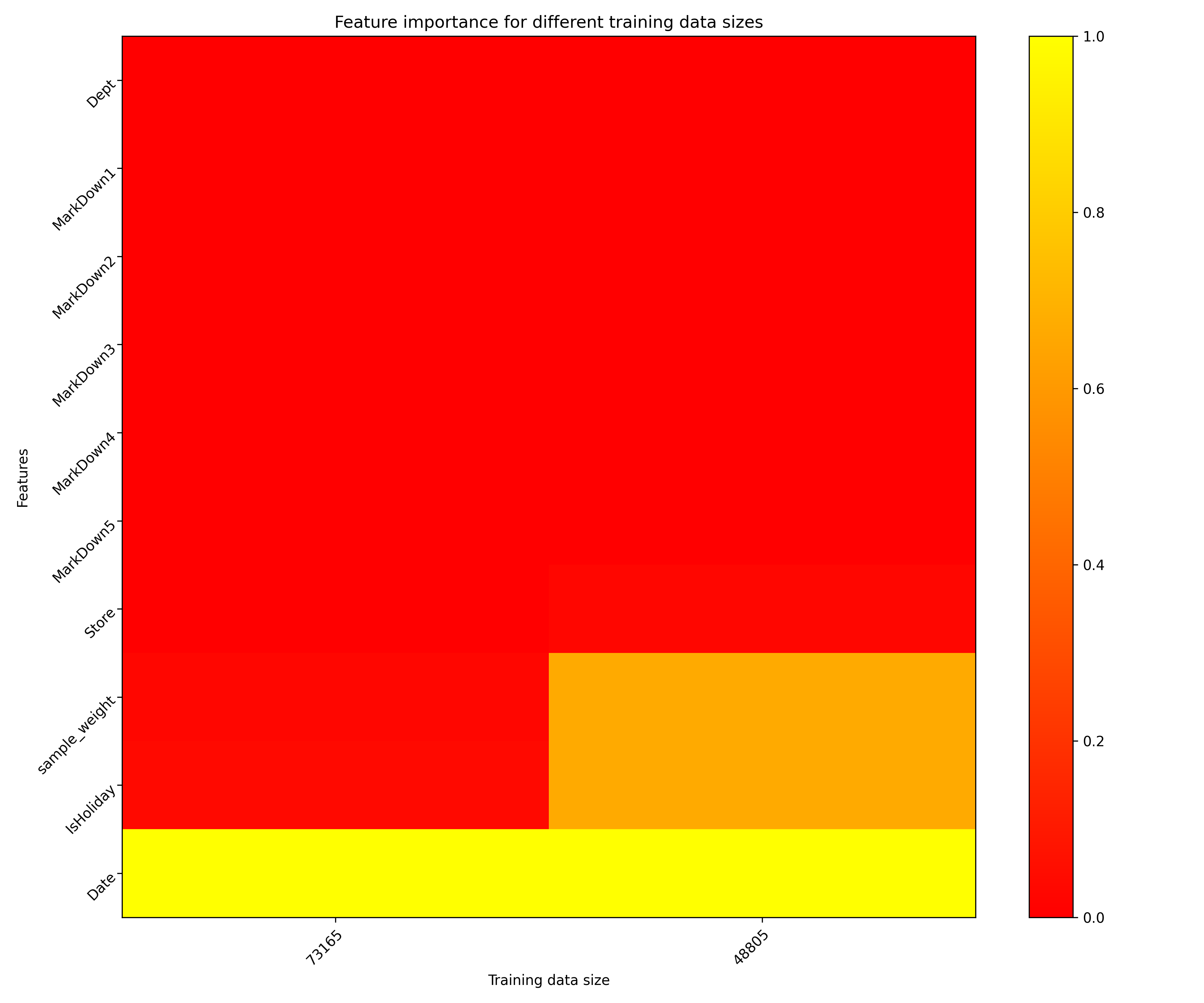
Explainer parameters:
worker_connection_keyThe connection ID of the Driverless AI worker configured in the H2O Sonar configuration. Supported are Driverless AI servers hosted by H2O AIEM or H2O Enterprise Steam, or Driverless AI servers that use username and password authentication.
time_colDefines the time column of the primary and secondary dataset, which explainer utilizes to perform time-based splits.
number_of_splitsDefines the number of splits that explainer performs on the primary dataset to assess dataset size dependency.
worker_cleanupDetermines if the explainer should delete the artifacts created in the worker. In this case, artifacts refer to experiments and datasets generated during the backtesting validation test. By default, explainer checks this setting (enables it), and accordingly, H2O Model Validation deletes all artifacts because they are no longer needed after the validation test is complete.
plot_typePlot type to be used for Partial Dependence rendering -
heatmap,contour-3dorsurface-3d.
The explainer can be run using the Python API as follows:
# configure Driverless AI server to serve as a host of artifacts (datasets, models) and/or worker
DAI_CONNECTION = h2o_sonar_config.ConnectionConfig(
   key="local-driverless-ai-server",  # ID is generated from the connection name (NCName)
   connection_type=h2o_sonar_config.ConnectionConfigType.DRIVERLESS_AI_AIEM.name,
   name="My H2O AIEM hosted Driverless AI ",
   description="Driverless AI server hosted by H2O Enterprise AIEM.",
   server_url="https://enginemanager.cloud.h2o.ai/",
   server_id="new-dai-engine-42",
   environment_url="https://cloud.h2o.ai",
   username="firstname.lastname@h2o.ai",
   token=os.getenv(KEY_AIEM_REFRESH_TOKEN_CLOUD),
   token_use_type=h2o_sonar_config.TokenUseType.REFRESH_TOKEN.name,
)
# add the connection to the H2O Sonar configuration
h2o_sonar_config.config.add_connection(DAI_CONNECTION)

# run the explainer (model and datasets provided as handles as they are hosted by the Driverless AI server)
interpretation = interpret.run_interpretation(
   model=f"resource:connection:{DAI_CONNECTION.key}:key:7965e2ea-f898-11ed-b979-106530ed5ceb",
   dataset=f"resource:connection:{DAI_CONNECTION.key}:key:8965e2ea-f898-11ed-b979-106530ed5ceb",
   testset=f"resource:connection:{DAI_CONNECTION.key}:key:9965e2ea-f898-11ed-b979-106530ed5ceb",
   target_col="Weekly_Sales",
   explainers=[
      commons.ExplainerToRun(
            explainer_id=SizeDependencyExplainer.explainer_id(),
            params={
               "worker_connection_key": DAI_CONNECTION.key,
               "time_col": "Date",
            },
      )
   ],
   results_location="./h2o-sonar-results",
)
The explainer can be run using the command line interface (CLI) as follows:
h2o-sonar run interpretation
--explainers h2o_sonar.explainers.size_dependency_explainer.SizeDependencyExplainer
--explainers-pars '{
   "h2o_sonar.explainers.size_dependency_explainer.SizeDependencyExplainer": {
      "worker_connection_key": "local-driverless-ai-server",
      "time_col": "Date",
   }
}'
--model "resource:connection:local-driverless-ai-server:key:7965e2ea-f898-11ed-b979-106530ed5ceb"
--dataset "resource:connection:local-driverless-ai-server:key:695f5d5e-f898-11ed-b979-106530ed5ceb"
--testset "resource:connection:local-driverless-ai-server:key:695df75c-f898-11ed-b979-106530ed5ceb"
--target-col "Weekly_Sales"
--results-location "./h2o-sonar-results"
--config-path "./h2o-sonar-config.json"
--encryption-key "secret-key-to-decrypt-encrypted-config-fields"
Explainer result directory description:
explainer_h2o_sonar_explainers_size_dependency_explainer_SizeDependencyExplainer_4d0ec4b4-38a7-4606-80a9-235e827532b7
├── global_3d_data
│   ├── application_json
│   │   ├── data3d_feature_0_class_0.json
│   │   └── explanation.json
│   ├── application_json.meta
│   ├── application_vnd_h2oai_json_csv
│   │   ├── data3d_feature_0_class_0.csv
│   │   └── explanation.json
│   └── application_vnd_h2oai_json_csv.meta
├── global_html_fragment
│   ├── text_html
│   │   ├── explanation.html
│   │   └── heatmap.png
│   └── text_html.meta
├── global_work_dir_archive
│   ├── application_zip
│   │   └── explanation.zip
│   └── application_zip.meta
├── log
│   └── explainer_run_4d0ec4b4-38a7-4606-80a9-235e827532b7.log
├── model_problems
│   └── problems_and_actions.json
├── result_descriptor.json
└── work
   ├── explanation.html
   └── heatmap.png
Explanations created by the explainer:
global_3d_dataFeature importance for different training data sizes in JSon, CSV and
datatableformats.
global_html_fragmentFeature importance for different training data sizes in the HTML format.
global_work_dir_archiveAll explanations created by the explainer stored in a ZIP archive.
See also: